Restaurant work, in detail

Orders, kitchen & fulfillment

Carry an order from the menu to the kitchen, fulfillment and payment.

Configure menus, taxes, stations, fulfillment rules and approved payment equipment. Processing and public online services have connectivity requirements.

Find the work you need to do.

HE POS

Catalog & menus

Full Platform; also HE POS package

Build the menu your team sells.

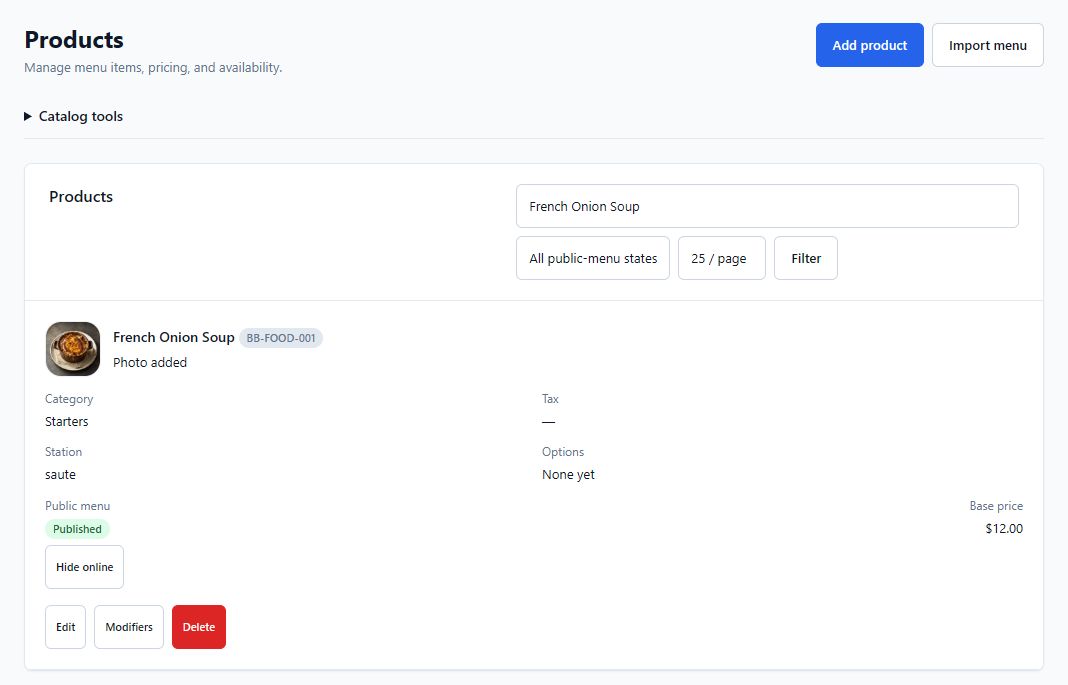
Organize categories, items, variants, prices, modifiers, availability and production stations. Review the published menu before service.

Before you use it: Prepare prices, tax rules, modifier choices and station routing.

Explore HE POS in detail →
HE POS

Register & order entry

Full Platform; also HE POS package

Take an order with its service context.

Keep items, seats, courses, guest counts and approved changes with the check. Use the register workflow for table or counter service.

Before you use it: Assign staff permissions and the register’s restaurant and location.

Explore HE POS in detail →

HE POS

Checks & payments

Full Platform; also HE POS package

Settle the check and retain the record.

Review tenders, tips, receipts, server checkout and controlled void or recovery actions. Restaurant guest payments use the restaurant’s separately configured merchant account.

Before you use it: Use an approved provider and supported reader configuration. Card processing requires internet.

Explore HE POS in detail →

HE POS

Kitchen, bar & expo

Full Platform; also HE POS package

Send the right work to each station.

Route tickets to configured production displays, review priorities and progress, coordinate expo and bar pickup, and use permitted hold, recall or refire controls. A displayed ticket is distinct from completed fulfillment.

Before you use it: Map menu items to stations and practice the kitchen-to-expo workflow.

Explore HE POS in detail →

HE POS

Online orders & fulfillment

Full Platform; also HE POS package

Review the order before it enters service.

Publish the configured storefront, review eligible incoming orders and carry accepted work into production, pickup or the supported driver/dispatch workflow. Keep intake, payment readiness and order state visible.

Before you use it: Enable the restaurant’s online ordering settings, availability, service rules and approved payment setup.

Explore HE POS in detail →

HE POS

Menu boards

Full Platform; also HE POS package

Show the menu intended for the room.

Prepare menu-board content and a display playlist from configured menu information. Review the exact screen and published availability before guests rely on it.

Before you use it: Assign the display, content and refresh behavior; confirm connectivity.

Explore HE POS in detail →

HE POS

Configured equipment

Full Platform; also HE POS package

Give each work area the connection it needs.

Use supported receipt printers, printer-connected cash drawers and approved station or payment equipment. Match each physical device to its service role.

Before you use it: Confirm exact models, connection method and a physical setup check. See Hardware & Setup for current availability.

Explore HE POS in detail →

HE POS

Floor & server board

Full Platform; also HE POS package

Keep service work with the right party.

Review the selected floor, server assignment and check context. Follow the linked party and check as service progresses, including a permitted table move.

Before you use it: Configure the supported HETable source and mapped employees. Reusing a table must not reuse a previous party’s private access.

Explore HE POS in detail →

Inspect the actual software.

Demo restaurant. Open a capture at full size; its caption identifies the task and any material limitation.

The next handoff

See what carries forward.

Follow the source, the receiving app and the person responsible for the next decision.

Explore the connected journey →

Choose the coverage that fits.

Full Platform; also HE POS package.

Compare packages and current availability →
Next step

One restaurant account. The whole operating day.

The Full Platform brings eight base applications and onboarding into one restaurant account. Apply to become a Launch Partner or book a walkthrough of the workflow you want to improve first.

Keep serving through an outage Supported POS and HETable workflows continue on the installed Hybrid Windows computer. Separate tablets and connected services need internet.
Roll out one workflow at a time Start with the clearest operational need, prove it with the team, and expand without creating another account system.
One sign-in for approved apps Each person sees only the restaurants, locations, and HospiEdge apps their account is allowed to open.