Restaurant operations software for daily control, audits, incidents, and follow-through
HospiEdge Ops Tool gives restaurant leaders one command surface for audits, incidents, manager-log follow-through, daily review, and command-center visibility so shift execution stays visible instead of drifting across binders, texts, spreadsheets, and memory.
Use Operations when daily follow-through, standards, and leadership accountability are the first problem to fix. Move to Contact only when rollout planning or account scope becomes the next question.
Ready now: The HospiEdge site and Operations page reflect a strong live build, a real working route, and a product that is ready to use now.
Choose Operations when leadership control is the first broken system
Use the first screen on this page to decide whether audits, incidents, manager-log follow-through, and daily operating control are the real starting point, or whether another HospiEdge product should lead instead.
Start here when
Audit quality is drifting, incidents are handled informally, manager follow-through disappears between shifts, or multi-location leaders need one operating review cadence instead of binders and text threads.
Start somewhere else when
Labor, timekeeping, and payroll-support workflow come first on Scheduling; guest flow and floor pacing come first on HETable; or service execution, sales truth, and checkout control come first on POS.
Next move after fit is clear
Stay on this page for workflow proof, then move into Pricing, Contact, or the live Operations app when the work surface already makes sense.
Operations at a glance
Understand the role of HospiEdge Operations quickly: what it controls, why restaurant teams buy it, and how to decide whether this is the right lead product.
What it is
The leadership command surface for standards, audits, incidents, daily review, command-center priorities, planner workflows, and day-to-day accountability.
Who it is for
Restaurant operators, GMs, area leaders, owner-operators, and support teams that need tighter standards and clearer operational ownership.
Why the connected path matters
Operations becomes more valuable when it anchors Schedule, HETable, POS, Server Checkout, inventory follow-through, Training & Reader inside Ops, Menu AI-assisted setup, and Label compliance routines inside one connected account path.
Operations is the leadership layer for audits, incidents, and daily review.
Use Operations when audits, incidents, manager follow-through, and daily review need one leadership command surface. Move to Pricing or Contact when commercial scope or rollout planning is next, or open the live Operations app once the workflow fit is clear.
What the Operations account already covers
Use this as the fast buyer proof band: the current build already supports the module set leaders expect to see on a serious restaurant operations landing page, and each module maps to a real before-service, during-service, or after-service outcome.
Command center
See today’s priorities, open items, ownership, and unresolved risk in one leadership view instead of scattered notes.
Audits and standards
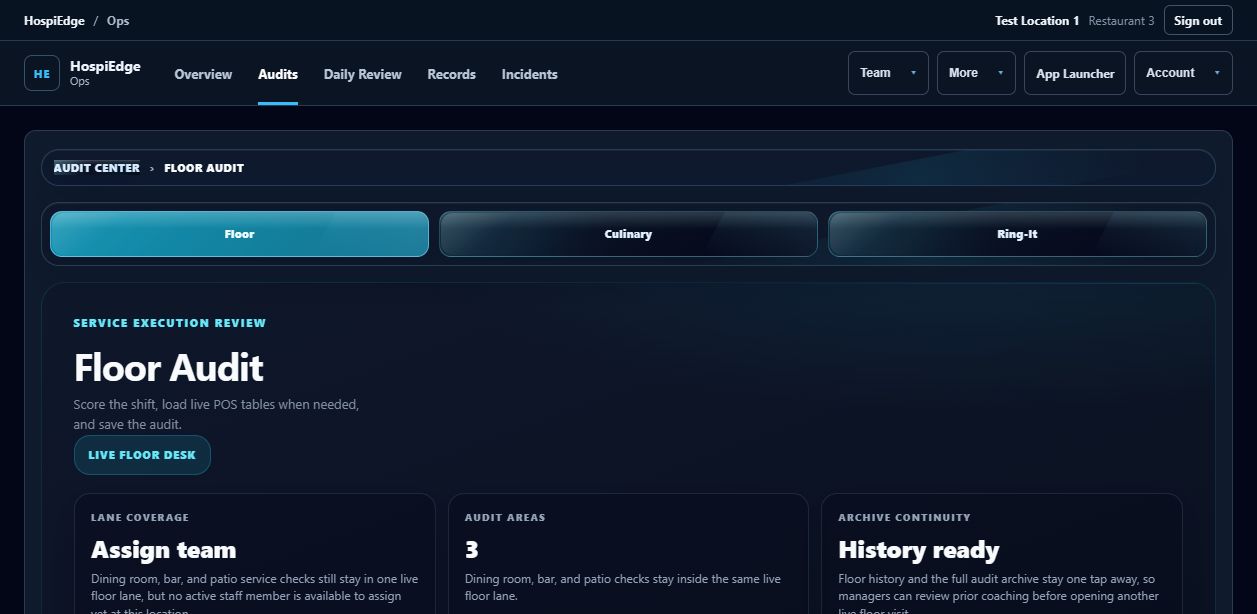
Run floor, culinary, opening, and closing checks with scoring, notes, evidence, and follow-through tied to the shift.
Incidents and corrective action
Capture what happened, assign ownership, track status, and preserve the resolution path until the issue is closed.
Goals, planner, and weekly review
Turn longer-range priorities into visible operating work with planner views, weekly review rhythm, and next-step accountability.
Alerts and coaching visibility
Surface performance signals, missed standards, and coaching opportunities before weak habits harden across shifts.
On-the-clock context
Use shared clock and staffing signals from Schedule to understand who is active, who should be leading, and where follow-up belongs.
Discipline and accountability
Keep policy issues, expectations, coaching notes, and accountability records structured enough for real leadership follow-through.
Reader and AI guidance
Support standards with built-in training content, authored guides, and AI help that stays tied to the operating system instead of a separate tool.
Connected compliance proof
Tie food-safety routines, checklist quality, and label/compliance processes into one cleaner execution path.
Follow the rhythm of a real restaurant day
Operations matters most when it follows service order instead of reading like a static feature list.
Before service
Review command center priorities, confirm audit readiness, check staffing/on-the-clock visibility, and launch the day with standards already assigned.
During service
Capture audits, log incidents, document coaching, and respond to alerts while the shift is still live and ownership is clear.
After service
Close the day with review, planner updates, exportable records, and a cleaner handoff into the next shift, next day, or next leader.
Who this operations system is built to help first
Use this section to decide whether the product fits the people who will actually own it once launch starts.
General managers
Need daily execution, manager follow-through, and cleaner visibility into what is drifting today.
Area leaders
Need cross-location consistency, stronger audit quality, and clearer accountability across stores.
Owner-operators
Need trustworthy visibility without living inside text threads, paper logs, and scattered spreadsheets.
Support teams
Need an easier way to review incidents, standards, and leadership follow-up without rebuilding the story each time.
What a first-time buyer can verify in the current build
The landing experience should show product reality clearly: current workflow depth, device fit, implementation shape, and how the software is used like an app instead of a brochure.
What exists now
The current build already covers audits, incidents, daily review, command center visibility, planner workflows, coaching, integrations, and multi-location controls.
Device fit
The experience is built to stay usable on phones, tablets, and desktop so managers can move through service without switching tools.
Installable app behavior
The platform is designed to behave like an installable app experience instead of a static brochure page.
Reporting and export
Daily review, visibility, and exportable output are already part of the workflow managers can verify in the current product.
Trust signal
The product is grounded in real manager workflows: service prep, on-shift accountability, incidents, follow-up, and next-shift handoff.
Implementation clarity
Operations is sold platform-first: one HospiEdge platform account unlocks the app stack, AI is included, and connected scope can expand cleanly by account count.
Why operators move away from paper, spreadsheets, and generic tools
These are the real buying triggers that make restaurant teams look for a purpose-built operations system.
From paper binders to live accountability
Teams switch when opening, shift, and closing standards need owners, timestamps, and follow-up instead of signatures in a binder.
From spreadsheets to faster daily review
Operators outgrow spreadsheets when incidents, action items, audit scores, and leadership notes have to move during service, not after the fact.
From disconnected checklists to one command path
Audits, incident reporting, manager log follow-up, daily review, and coaching work better when they share one operating rhythm.
From generic tools to restaurant workflow proof
Buyers switch when they need software that feels built for shift launches, compliance routines, and manager accountability instead of generic task tracking.
What this page should make clear
HospiEdge was built to make standards easier to run, follow-up harder to ignore, and manager workflows usable during service. That is why Operations is presented as the strongest first buying path instead of a side feature inside a crowded stack.
Platform plans & pricing for Operations-led launch
Operations is sold platform-first. One active HospiEdge platform account unlocks the app stack, AI is included in every platform plan, and the multi-account bundles make it easier to roll out Operations with the rest of the connected system. How the platform route works or talk through rollout.
Platform 1
Launch annual billing: $2,899/year • Public pricing after launch: $349/month
Best for one operating account that wants leadership control, workforce, floor flow, service, labeling, and training on one connected system.
- 1 active platform account
- Operations, Schedule, HETable, POS, and Label included, with Training & Reader inside Ops
- AI included
- Command center, planner, alerts, and accountability workflows
- Shared clock, payroll context, and compliance-ready connected path
Platform 3
Launch annual billing: $7,799/year • Public pricing after launch: $949/month
Best for growing operators standardizing standards, labor, floor flow, service, and label workflows across multiple accounts.
- 3 active platform accounts
- All included apps unlocked for every bundled account
- AI included
- Better fit for multi-location leadership rhythm
- Cleaner launch for shared training, payroll context, and compliance proof
Platform 10
Launch annual billing: $22,999/year • Public pricing after launch: $2,790/month
Best for larger groups that want the full HospiEdge operating system standardized across a bigger footprint from the start.
- 10 active platform accounts
- All included apps unlocked for every bundled account
- AI included
- Region-ready leadership and accountability coverage
- Better economics than piecing together multiple standalone vendors
Schedule is $199/month, HETable is $249/month, POS is $349/month, and Label is $149/month. Ops is positioned platform-first so the bundle stays the obvious value.
Operations software in context
Real product and hospitality imagery helps ground the operations story.
What is restaurant operations software?
Restaurant operations software is the daily leadership system for consistency and accountability. It standardizes how managers complete audits, document incidents, track follow-up actions, and run shift-level execution routines.
Strong deployments combine restaurant daily review software, restaurant accountability software, and restaurant food safety audit software so each location follows the same manager workflow standards.
What is restaurant operations software?
It is the operating layer that structures daily execution, documentation, and managerial follow-up across every shift.
How is it different from scheduling software?
Scheduling software manages labor plans, shared clocks, timesheets, payroll review, and people-admin workflows; operations software manages execution quality, audits, incidents, and accountability.
Who this restaurant operations software is for
Built for operators who need better daily standards, clearer ownership, and stronger performance visibility.
Single-location leadership teams
Replace paper logs with structured audit and follow-up workflows.
Multi-unit restaurant groups
Standardize incident handling and manager accountability across locations with multi-unit restaurant operations software workflows.
Owner-operator organizations
Get clearer operational visibility without chasing updates from different tools.
Problems it solves
Practical issues operations leaders face when systems are fragmented.
Missed or inconsistent audits
Track completion and quality so audit discipline is measurable, not optional.
Incident follow-up gaps
Document incidents with status and ownership so actions are completed.
Weak manager handoffs
Use daily review workflows to hand off open priorities and unresolved items so the next shift leader starts with a clear picture.
Disconnected log books
Bring daily notes, incidents, and accountability into one searchable system.
Unclear coaching priorities
Use AI coaching and operational trends to support manager development.
Limited visibility for owners
Surface operational trends so leadership can act earlier.
Core restaurant operations software workflows
HospiEdge Operations combines restaurant audit software, manager-log follow-through, planner workflows, and leadership accountability in one command surface.
Restaurant audit software
Run structured checks with scoring, notes, and evidence capture across compliance and food safety audit software workflows without separating printer/template/defaults and labeling discipline from the rest of daily accountability.
Restaurant incident reporting software
Capture incident details, assign ownership, and track resolution status.
Discipline and accountability
Document patterns and action plans with clearer leadership follow-through.
Restaurant daily review software
Align managers on immediate priorities and unresolved issues before each shift.
AI coaching support
Use built-in coaching assistance to improve manager consistency and response quality.
Integrations and command workflows
Connect operations signals with adjacent labor, service, closeout, inventory, and admin workflows.
Publishing lives inside the built-in platform reader
HospiEdge is more than the operations app. Active platform access on hospiedgetool.org keeps Training & Reader access inside Ops for the active account, where HospiEdge Publishing books remain available as part of the active-account reader value.
Books inside the platform reader
Read HospiEdge Publishing titles from the installed reader instead of sending teams to separate systems.
Leadership and operations context
Use books and frameworks that support manager development, standards, accountability, and hospitality leadership.
Better training continuity
Keep daily execution tools and reference material closer together so teams can move from reading to action faster.
Why this matters on the operations page
This page should show that active users are getting daily operations software, reader access, and a publishing layer that strengthens the active platform account value.
Why operators outgrow paper logs and disconnected tools
Paper logs and scattered chat threads can store information, but they rarely enforce completion, ownership, or operational visibility. Operations workflows make standards executable and measurable.
From records to execution
Move from passive logging to action-based workflows with clear status progression.
From fragmented notes to accountability
Track who owns what, what is overdue, and what still impacts shift quality.
How this restaurant operations software fits into the full platform
Use the related links below only when labor planning, front-door flow, service truth, label control, or publishing access become the next question. Keep this page focused on audits, incidents, daily review, and accountability.
Active hospiedgetool.org platform accounts keep linked access working best when the same email address is used across every HospiEdge account.
FAQ
Answers for buyers evaluating restaurant daily operations software.
What is restaurant operations software?
Restaurant operations software is the system managers use to run daily standards: audits, incident reporting, follow-up actions, and leadership accountability. It keeps execution visible and trackable across shifts and locations.
How is restaurant manager log book software different from a basic log?
A basic log book records notes. Restaurant manager log book software adds workflow status, accountability ownership, evidence capture, and performance follow-through so issues are resolved instead of forgotten.
Who should start with restaurant operations software first?
Teams should start when audit completion is inconsistent, incidents are tracked informally, or leadership follow-up depends on memory and message threads. It is often the clearest first buying path when daily execution is the bottleneck.
Is the built-in HospiEdge reader part of platform access?
Yes. Active hospiedgetool.org platform accounts keep reader access inside the wider platform experience, and HospiEdge Publishing books remain available there as part of the active platform account value.
Can operations software connect with scheduling and table workflows?
Yes. Operations sits inside the connected HospiEdge platform alongside Schedule, HETable, POS, Server Checkout as the payroll-ready source of truth, inventory follow-through, Menu AI-guided setup, Training & Reader content inside Ops, and Label workflows for printer defaults, templates, reprints, and compliance routines. Use the same email address across all accounts to keep linked access working.
Start with platform access
Join with an active hospiedgetool.org platform account when Operations is the lead product. Launch Partner pricing starts at $279/month or $2,899/year for 1 account, with $749/month or $7,799/year for 3 accounts and $2,190/month or $22,999/year for 10 accounts. Use the same email address across linked accounts when wider rollout is next.
Evaluate Operations as a real operating layer for audits, incidents, and daily review.
Review workflow proof here first, compare platform pricing only when account scope is the next question, and move to Contact only when rollout planning is the next decision.
Published commercial model
The HospiEdge platform account is the unlock layer, the 1, 3, and 10 account plans are visible publicly, standalone app pricing is published, and Agent stays separate as a premium lane above active bundle apps.
Live routes under one operating model
Ops, Schedule, HETable, POS with Server Checkout, Label, Menu AI, and Training & Reader inside Ops are presented as connected layers of one restaurant operating system, while the HETable buyer page, guest-facing Public Reservations path, Hospi Jobs buyer page, and public jobs network stay clearly split from operator routes.
Visible leadership and direct accountability
HospiEdge keeps the founder-led and family-run company story visible so buyers can connect the software path to named leadership, direct contact, and a clear point of view instead of a faceless shell.
AI and training stay inside the platform story
AI is included in every platform plan, and Training & Reader inside Ops stay tied to execution, standards, and launch support instead of being held back as disconnected extras.
Buyer checklist
- Start with Pricing when the real decision is platform bundle versus standalone spend, then move into app pages when you need workflow-fit proof.
- Keep HETable buyer review, Public Reservations, Hospi Jobs, and live operator app routes separate so the next click matches the real job.
- Use About or Contact when you want to verify who leads the company and how launch and implementation stays direct.
- Use Resources or Engineering when you want workflow depth, architecture proof, or modernization context.
- Keep the same email address across HospiEdge accounts when linked access matters.