HETable

Restaurant table management for the live front door

HETable keeps reservations, walk-ins, waitlist, quoting, seating, section pacing, and floor visibility inside one host-stand control surface so the room stays readable before service hands off into live checks and closeout.

Shift job Keep the queue, room state, host decisions, and seating pace visible in one place instead of splitting the front door across separate reservation, waitlist, and floor tools.
Best fit Start here when the host stand is the bottleneck: quotes drift, sections lose balance, waits feel unreliable, or the room changes faster than the team can coordinate.
Commercial path Review front-door control first, then move to Pricing, Public Reservations, or Contact only after the seating and pacing lane already fits the restaurant.

Need more category context first? Read the waitlist buyer guide. Move to Contact only when rollout ownership or location setup becomes the next job.

Ready now: The HospiEdge site and HETable page reflect a strong live build, a real working route, and a product that is ready to use now.

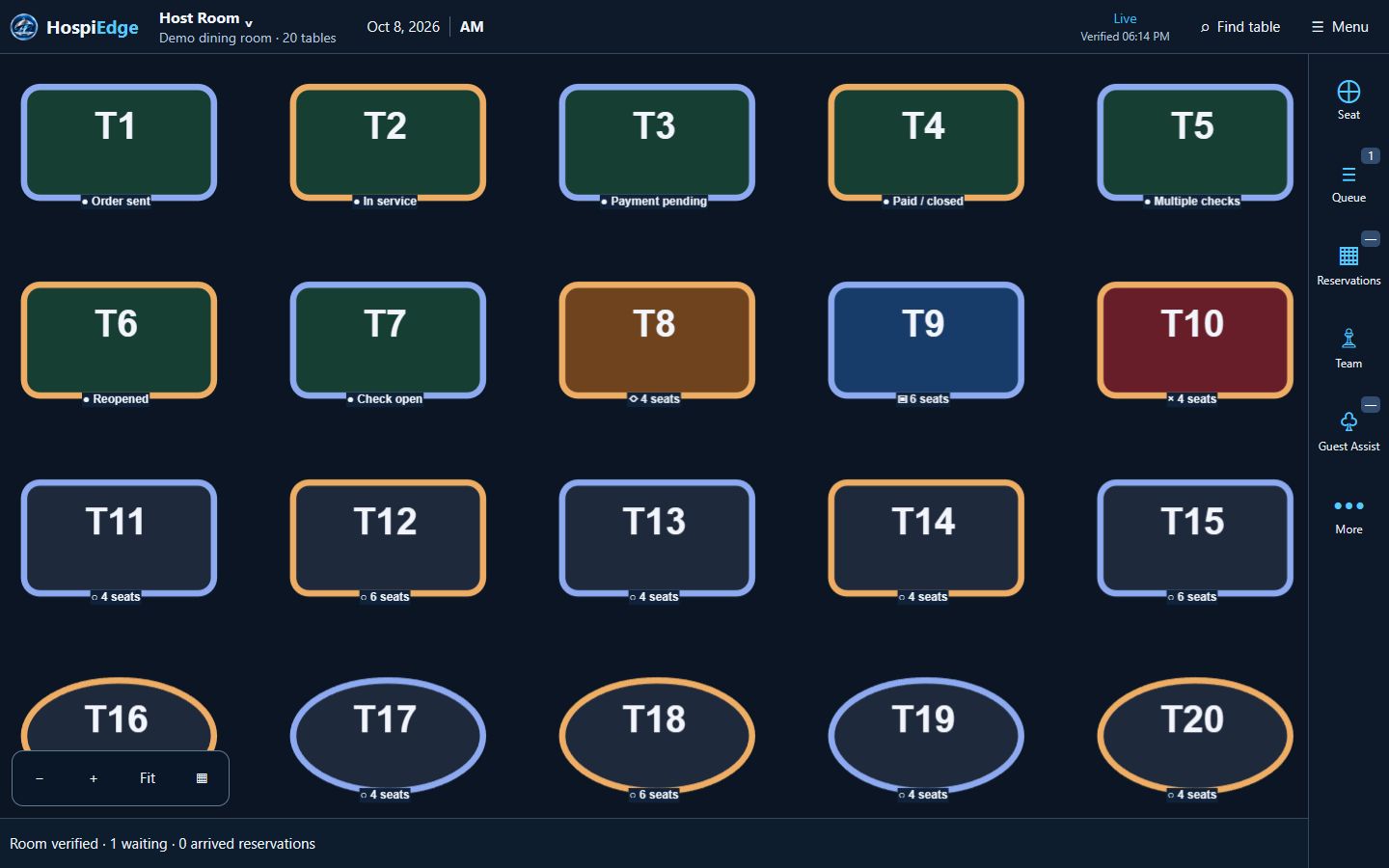
Floor-flow diagram

See reservations, waitlist, sections, self-seat options, and pacing together in one host-stand view.

See the queue, room state, self-seat entry, and service pacing together so the team can judge real front-door control instead of isolated category labels.

  • The diagram shows how reservations, waitlist, self-seat, sections, and pacing stay connected during service.
  • It gives hosts and managers a more concrete picture of how floor-state control works under pressure.
  • Move to Public Reservations for guest discovery, Pricing for the plan choice, or the waitlist guide if the team still needs category education.

Choose HETable when the front door needs one live control surface

Use the first screen on this page to decide whether reservations, waitlist, seating, and floor pacing are the first broken systems, or whether another HospiEdge product should lead the buying path instead.

Start here when

Quotes feel unreliable, the host stand is juggling separate tools, section balance drifts during rushes, guests wait without clear updates, or the team cannot trust the live room state fast enough to seat with confidence.

Start somewhere else when

POS should lead when ordering, routing, payment control, and closeout truth are the real pressure point; Scheduling should lead when labor planning, timekeeping, and payroll review are the weekly drag; Operations should lead when audits, incidents, and manager follow-through are still the biggest control gap.

Next move after fit is clear

Stay on this page for workflow proof, then move into Pricing, Public Reservations, or Contact once the front-door lane already makes sense.

Public reservations and restaurant discovery

HETable is not only an internal host-stand system. It also gives restaurants a public reservation layer on hetable.com where guests can browse locations, open restaurant pages, and start the right reservation or call-ahead path.

Main public destination

Use the public reservations directory when you are sending guests from marketing pages, navigation, footer links, or general campaign traffic.

Location pages when the restaurant is already known

Use direct location pages only when you are promoting one known restaurant. The pattern is https://hetable.com/reservations/location.php?slug={location-slug}.

Why this matters

Guests get a cleaner discovery path, restaurants keep the booking flow on their own system, and the public reservations hub stays easier for search engines and AI systems to find and understand.

Public reservation pages

Give guests a public place to discover locations, open restaurant pages, and start reservations or call-ahead seating through HETable.

Use the main public directory for general traffic. Save direct location links for pages that already know the exact restaurant slug.

Use the live app route only when operators or reviewers need to inspect the host board, live floor state, or seating workflow itself.

Choose your pricing path

HETable is $249/month standalone with no per-cover fees. Teams that want the connected stack can use HospiEdge Platform launch pricing at $279/month or $2,899/year for 1 account, $749/month or $7,799/year for 3 accounts, or $2,190/month or $22,999/year for 10 accounts, with AI included in every plan.

Standalone plan

Buy HETable by itself

$249 / month

No per-cover fees. Best when HETable is the only front-door app you need right now.

  • Best when table management is the only app you need right now.
  • Built for floor plans, host stand control, reservations, waitlist, guest self-seat, notifications, drag moves, and live seating flow.
  • Strong fit for restaurants solving immediate front-of-house bottlenecks without buying the full stack first.

Standalone HETable is intentionally priced above the platform bundle to make the connected stack easier to justify when more apps are in play.

Buyer clarity

Choose the public reservation path when guest discovery matters, then decide whether HETable stays standalone or expands into the full platform.

Use Public Reservations for guest-facing traffic, Pricing for the standalone-versus-platform decision, and Contact when the next job is launch planning.

Who HETable is for

Use HETable when the team needs a real host-stand operating layer, not just a reservation inbox.

Independent restaurants

Run the floor, reservations, waitlist, and guest-facing booking flow from one place when the front door is still operated by a small team.

Multi-unit groups

Standardize floor plans, booking controls, reports, and locations-dashboard oversight without forcing every location into a separate workflow.

Hosts and managers

Give the host stand, reservations desk, and manager console one shared view for queue control, seating quality, pacing, and service readiness.

Guest-facing operations

Support public booking, confirmation/cancellation, wait board, self-seat, kiosk concierge guidance, and live guest communication from the same room-aware system.

Problems solved during live service

The platform is designed to fix operational friction at the host stand before it hurts guest flow.

Inconsistent wait quotes

Hosts can quote from live demand and table status instead of guesswork and sticky notes.

Walk-ins vs reservations conflict

One queue for both prevents over-seating one section and starving another.

Floor visibility gaps

Managers can see section load, table turns, and bottlenecks in real time.

Host coordination issues

Shared service state reduces duplicate notes and missed party updates between shifts.

Unbalanced section pacing

Section management tools help teams spread covers more evenly across staff.

Guest communication delays

Notification workflows keep guests informed when tables are ready.

How service runs shift by shift

HospiEdge is restaurant reservation and waitlist software that supports the full shift lifecycle.

1. Pre-shift setup

Open the active floor plan, verify sections, confirm service rules, and make sure hosts and managers are looking at the same published floor before doors open.

2. Queue control

Track arrivals, reservation status, and walk-ins from one host stand queue, including quote changes, no-shows, and note handoff during the first rush window.

3. Seating decisions

Assign tables by live availability, turn timing, and section pacing, then confirm seated-party moves and linked-table changes do not break the room view.

4. Mid-shift balancing

Adjust sections, table states, and wait expectations as demand changes, with a clear manager owner for section overrides and pacing resets.

5. Close and handoff

Complete final table updates so next shift starts with a clean service view and the next opening team does not inherit stale queue or table state.

Core product pillars

These grouped pillars match the real HETable surfaces already visible in the current product build.

Floor plans and table management

Build, version, and publish live floor plans, then keep table states, turns, links, and seating assistance grounded in the actual room instead of a static diagram. Buyers should verify who publishes the active floor, how rollback works, and how the opening team confirms the correct layout is live before doors open.

Host stand, reservations, and waitlist

Run reservations manager, walk-ins, quotes, live waitlist flow, and public booking from one front-door workspace without forcing hosts to jump between separate tools. A real review should test no-shows, quote edits, stale parties, and re-seating decisions during a rush.

Self-seat, kiosk, and guest concierge

Support self-seat and guest kiosk entry, concierge-style guidance, confirmation/cancellation flow, and public wait board experiences that stay connected to real floor capacity.

Team execution on the floor

Use sections, Smart Assign, station assignments, suggested seating help, Pocket View, drag-and-drop moves, and live table-state updates so hosts and floor teams stay aligned during service. The proof point is whether hosts, managers, and servers all see the same room state when the floor changes mid-shift and when a table has to move fast.

Management, reporting, and multi-location oversight

Managers can use reports, booking settings, ratings/performance surfaces, locations dashboard views, and published-floor controls to standardize execution across shifts and locations.

Controls, integrations, and security

Permissions, security policies, audit-aware admin surfaces, API keys, and webhooks keep HETable usable as an operating system layer instead of a lightweight reservation widget.

How the workflow changes by role

Managers, hosts, floor teams, and guests all use different surfaces, but they should still stay inside one room-aware service picture.

Managers

Set up plans, publish the right version, tune booking rules, watch reports, manage locations, and control permissions, Smart Assign, and service policy. In most implementations they also own pre-shift floor verification and first-week pacing adjustments.

Hosts

Launch the host board, work reservations and walk-ins together, quote waits, seat suggested tables, manage waitlist state, and keep the room balanced. A good demo should show hosts handling walk-ins, no-shows, drag moves, and notification updates without losing the queue.

Floor teams and servers

Use Pocket View, station assignments, section load, and table-state updates to stay synced with the host stand before live POS service takes over. Their part of the proof is whether section changes and table updates stay visible without side conversations.

Guests

Book online, confirm or cancel reservations, join the waitlist, receive notifications, watch live wait status, or self-seat through kiosk and guest flows when the restaurant enables them.

What exists in the current HETable build

The current HETable build already includes public guest channels, live host workflows, floor-team execution surfaces, manager oversight, and admin controls.

Floor plan builder and publish flow

Managers can build digital floor plans, maintain versions, and publish the right plan before service instead of relying on static diagrams. Buyers should verify how fast an opening manager can publish a change and how the team confirms the new plan is live.

Live host stand operations

The host dashboard is built for real seating decisions, quote control, live table visibility, drag-and-drop seated-party moves, and station awareness during active service. The proof question is whether the host can keep moving without opening a second tool or waiting on a manager.

Reservations, waitlist, and booking

The current app supports reservations, walk-ins, waitlist handling, public booking pages, a public reservation directory, guest notifications, large-party table linking, and a direct handoff into live service inside one front-of-house layer.

Guest kiosk and self-seat paths

Guest-facing kiosk and self-seat entry points make the product broader than a reservation list alone and keep the host stand connected to guest-facing flow.

Manager console and controls

Sections, smart assign, team controls, ratings, booking settings, permissions, security, active floor source selection, audit tools, API keys, webhooks, and reports are part of the current platform. Buyers should ask which of these controls a shift leader can change live and which require admin review.

Connected POS fit

HETable can stay the source of floor truth while POS extends the flow into Server Checks, ordering, payments, Server Checkout, and business-day control.

How HETable fits with POS without confusing the buyer

This page stays front-door first. The POS page covers ordering, production, payment, and closeout after the room handoff, while Operations covers accountability and follow-through so each page keeps a clear job.

HETable owns the front door

Keep reservations, walk-ins, waitlist, seating, and floor pacing anchored here so front-door control stays clear from discovery through live service.

POS owns live check execution

When service moves from seating into ordering and production, POS takes over with table-linked checks, routing, payment, and closeout workflows.

The connection point is the live floor

POS can use the live HETable plan as a board source for Server Checks, which keeps table context visible at service time without forcing hosts and servers into the same screen.

Live demo checklist for restaurant table management software

Use these questions to test whether a front-of-house platform can actually support the room during a busy shift and whether the team can verify that quickly in a live demo.

What to confirm before you buy

  • Can hosts manage reservations, walk-ins, and the waitlist without switching between disconnected views?
  • Does the floor plan reflect live table status and section pressure clearly enough to guide seat decisions?
  • Can managers rebalance sections and pacing rules without creating confusion at the stand, and is it obvious who owns that override on shift?
  • Are guest notifications, notes, and handoffs tied to the actual queue state, with history visible enough for shift-change review?
  • Does the pricing path stay clear whether you buy HETable standalone or through the platform account unlock layer?
  • Can the implementation plan cover floor setup, staff training, service rules, first-week quote tuning, post-shift review ownership, and the exact owner of publish and rollback decisions?

Outcomes from restaurant table management software

Shared room state, better quote discipline, and clearer seat decisions show up as practical service outcomes teams can feel on shift.

Faster seating decisions

Hosts spend less time searching and more time seating with confidence.

Better guest flow

Live pacing tools reduce bunching and keep the dining room moving.

More accurate wait quotes

Wait expectations are based on real table availability and turn status.

Smoother turns

Service timing and table-state updates reduce lost turns and make the next seat easier to call with confidence.

Less host stand chaos

Shared context for hosts and managers reduces conflicting decisions.

HETable vs common alternatives

Compare this platform against paper reservation books, reservation-only tools, and per-cover-fee platforms.

Comparison point HETable Paper reservation book Generic reservation-only tools Per-cover-fee tools
Live table visibility Real-time table state and section view Manual updates and verbal handoffs Limited to booking records Varies by plan tier
Reservations and waitlist One queue for walk-ins and reservations Separate lists and manual reconciliation Often split across different views May include upsell-driven queue features
Floor plan and section control Built-in section assignment and pacing tools No digital floor state Basic layouts or none Feature access can depend on spend
Pricing model $249/month standalone, or platform access starting at $279/month or $2,899/year for 1 account No software cost, high process overhead Subscription pricing, feature limits vary Per-cover fees increase variable cost
Operational fit Designed for live service decisions at the host stand Relies on memory and paper discipline Strong for booking intake, lighter for shift control Can create margin pressure at high volume

In action

A quick look at common host and manager workflows.

Pricing, implementation, and buyer fit

Practical buying guidance for operators evaluating restaurant seating and host stand platforms.

Pricing at a glance

HETable is $249/month standalone with no per-cover fees, while HospiEdge Platform launch pricing starts at $279/month or $2,899/year for 1 account and scales through 3-account and 10-account bundles with matching annual billing options. Use standalone when front-door control is the only active project. Use the platform path when the rollout already includes other HospiEdge apps.

Setup expectations

Typical implementation covers floor configuration, section logic, booking windows, host workflow training, and manager controls.

Best fit

Choose standalone when table management is the only immediate need. Choose HospiEdge Platform when you want HETable tied into the broader HospiEdge implementation with AI included.

FAQ

Common buyer questions from operators evaluating table, host stand, and waitlist tools.

How is this different from a reservation-only tool?

Reservation-only tools mainly store bookings. HETable combines reservations, walk-ins, waitlist, floor plan control, section assignments, guest kiosk/self-seat options, and live table status in one service workflow.

Can hosts run reservations and waitlist in one place?

Yes. The host team can run reservations and walk-ins from one queue, quote waits, send notifications, and seat based on live floor capacity while POS can later extend the service flow into Server Checks, checks, payments, and closeout.

Does HETable charge per-cover fees?

No. HETable does not use per-cover fees. The standalone plan is $249/month. Teams that want the connected platform can use HospiEdge Platform launch pricing at $279/month or $2,899/year for 1 account, $749/month or $7,799/year for 3 accounts, or $2,190/month or $22,999/year for 10 accounts, with AI included in every platform plan.

Who should buy the standalone table plan?

Choose standalone when front-door control is the main need and you only need HETable. Choose the platform path when you want HETable connected to HospiEdge Ops, HospiEdge Schedule, HospiEdge POS, HospiEdge Label, AI, and Training & Reader inside Ops in one connected implementation path.

What does implementation look like?

Implementation usually starts with floor setup, table naming, service rules, section structure, booking windows, active floor source choices, quote standards, and host training. Buyers should verify who publishes the floor, who owns section changes on shift, how notifications are triggered, and how first-week pacing adjustments are reviewed after service.

Is this software built for table turns and section pacing?

Yes. Teams use HETable as restaurant table turn software and section pacing software, with live table state, section load, and suggested seating help visible at the host stand.

What control surfaces exist for managers and admins?

Managers can work from sections, Smart Assign seating suggestions, booking settings, reports, locations dashboard views, permissions, security rules, API keys, and webhooks without leaving the front-of-house control layer.

Do floor teams and guests interact with the system too?

Yes. Floor teams can use Pocket View and station-linked status updates, while guests can use public booking, confirmation/cancellation, live wait board, self-seat, and kiosk-style entry where those channels are enabled.

Ready to launch a better host stand workflow?

Choose the standalone HETable plan for $249/month when you only need front-door control. Choose HospiEdge Platform when HETable needs to launch alongside other HospiEdge apps, starting at $279/month or $2,899/year for 1 account. Send guests to Public Reservations when discovery is the next job, and use Contact when the team is ready to plan the rollout.

HETable workflow preview

See the floor-flow proof like a working host stand, not a generic queue page.

This proof system shows reservations, waitlist, floor state, sections, and pacing together in one service view so the team can judge live front-door control.

HETable floor and queue preview
Reservations and waitlist together Floor status stays live Section pacing stays visible
Host stand view

Queue and floor stay together

The proof layer now shows how quoted waits, arrivals, sections, and floor state belong in one operating view.

Public route split

Guest and operator paths stay distinct

Buyers can see the difference between the HETable buyer page, Public Reservations, and the live host-stand route faster.

Next move

Check pricing, launch, or guide depth

Teams can compare plan choice, rollout help, or category education without losing the front-door proof thread.

Queue control

Keep reservations, quoted waits, and arrivals inside one organized service view.

The host stand should not have to translate between multiple lists just to seat the floor well.

  • See arrivals and waits in one place.
  • Keep quoted times visible.
  • Move guests cleanly into the floor.
Floor pacing

The floor view should show where the next seat belongs and where the pressure is building.

HETable works best when table state and section balance are visible at a glance.

  • Track table state across the room.
  • See section load before the next seat.
  • Keep pacing steadier during rush periods.

Before you continue

  • Whether host stand control is the core issue.
  • Whether the next decision is guest discovery, plan choice, or rollout review.
  • How reservations, waitlist, and pacing are handled today.

Implementation path

  1. Validate the queue, public reservation path, and floor workflow first.
  2. Use the waitlist guide, Pricing, or Public Reservations only after the fit is clear.
  3. Use Contact when the team needs implementation help.
Front-of-house review path

How operators usually validate HETable before they make a front-door management decision.

Judge host stand control, waitlist fit, pacing, and floor flow here first. Move into Pricing, Public Reservations, Contact, or guide depth only after the front-door workflow itself feels right.

Best fit

This page fits restaurants that need stronger queue control, seating coordination, sections, reservations, or floor visibility without per-cover pricing.

Verify next

Open the waitlist guide if the team still needs queue-control education, use Pricing when the plan choice becomes the next question, use Public Reservations when the next job is guest discovery, and use Contact when rollout planning becomes the next step.

Keep the review grounded

Teams move faster when they review actual front-of-house pressure instead of mixing floor flow with unrelated back-office buying questions.

Recommended sequence

  1. Review the host stand, waitlist, and pacing sections first.
  2. Use the waitlist guide if the team still needs buyer education or comparison language.
  3. Choose standalone or the platform bundle once the workflow fit is clear.
  4. Use Contact when implementation or setup questions need a real conversation.
HETable buyer clarity

Evaluate HETable on its own, then compare it with the platform bundle when more than one app is in play.

Keep the front-of-house pitch simple: no per-cover fees, clear standalone pricing at $249/month, a public reservation path on hetable.com, and a platform option only when the rollout already includes other HospiEdge apps.

Published commercial model

The HospiEdge platform account is the unlock layer, the 1, 3, and 10 account plans are visible publicly, standalone app pricing is published, and Agent stays separate as a premium lane above active bundle apps.

Live routes under one operating model

Ops, Schedule, HETable, POS with Server Checkout, Label, Menu AI, and Training & Reader inside Ops are presented as connected layers of one restaurant operating system, while the HETable buyer page, guest-facing Public Reservations path, Hospi Jobs buyer page, and public jobs network stay clearly split from operator routes.

Visible leadership and direct accountability

HospiEdge keeps the founder-led and family-run company story visible so buyers can connect the software path to named leadership, direct contact, and a clear point of view instead of a faceless shell.

AI and training stay inside the platform story

AI is included in every platform plan, and Training & Reader inside Ops stay tied to execution, standards, and launch support instead of being held back as disconnected extras.

Buyer checklist

  • Start with Pricing when the real decision is platform bundle versus standalone spend, then move into app pages when you need workflow-fit proof.
  • Keep HETable buyer review, Public Reservations, Hospi Jobs, and live operator app routes separate so the next click matches the real job.
  • Use About or Contact when you want to verify who leads the company and how launch and implementation stays direct.
  • Use Resources or Engineering when you want workflow depth, architecture proof, or modernization context.
  • Keep the same email address across HospiEdge accounts when linked access matters.