Hospi Label

Restaurant label printing for exact reprints, route control, and prep execution

Hospi Label keeps Easy Print, template control, shelf-life labeling, route readiness, and exact reprints inside one print-control lane so prep teams can keep moving without turning relabeling into guesswork or pushing printer failures into POS service flow.

Shift job Keep label output, reprints, template choice, and print-route control inside one usable shift lane instead of scattered browser print attempts and ad-hoc relabeling.
Best fit Start here when the kitchen loses time to broken routes, inaccurate reprints, inconsistent prep labels, or missing print accountability.
Commercial path Review print-control proof first, then move to Pricing, Contact, or the live app only after the labeling lane already fits the restaurant.

Use the proof and diagnostics sections here when relabeling, route failures, or exact reprints are the first operating problem. Move to Contact only when rollout readiness or launch ownership becomes the next job.

Ready now: The HospiEdge site and Hospi Label page reflect a strong live build, a real working route, and a product that is ready to use now.

Choose Label when print control is the first thing breaking prep flow

This page should make the ownership boundary obvious: Label is the buyer lane when templates, route readiness, exact reprints, batching, and compliance printing are the immediate operational pain, not when the main question is still service truth or manager accountability.

Start here when

Teams are relabeling under pressure, printer routes are unreliable, batch printing is messy, compliance checks are hard to prove, or kitchen operators need exact reprints instead of one-off browser print attempts.

Start somewhere else when

POS should lead when menu execution, service routing, and sales truth are still the main question. Finance should lead when the issue is close and reconciliation, not print control. Operations should lead when standards and accountability are the first broken lane.

Next move after fit is clear

Use the proof and diagnostics sections here first, then move into Pricing, Contact, or the live Label app once the print-control lane is already the right fit.

What Hospi Label proves

Labeling should feel like a real operating layer, not a browser print hack or a disconnected utility.

Easy Print for active prep

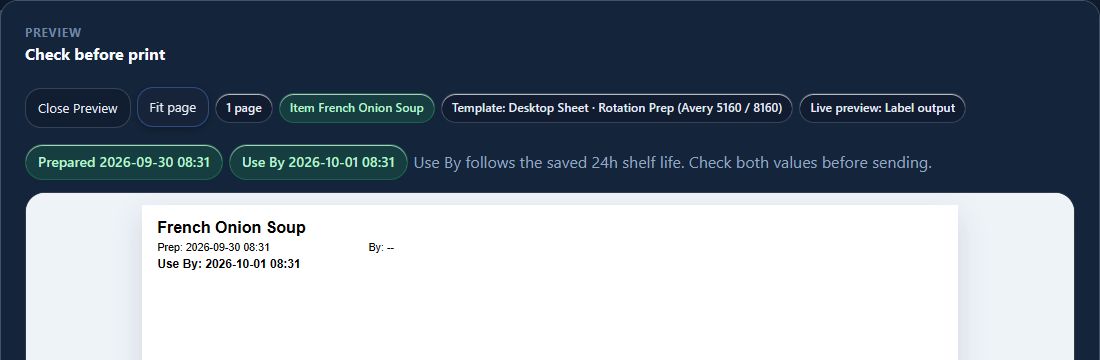
Open a printer-ready workflow fast, choose item + template + quantity, and keep shift printing simple enough for real line use.

Exact reprints from print history

Reprint the same label again with the same template, timing logic, and operator-visible print record instead of rebuilding it by memory.

Avery batching for office-printer workflows

Run grouped Avery sheet output when teams are batching prep, testing a launch, or bridging from office printers before dedicated label hardware is in place.

Printer profiles across routes

Keep office, Brother, Zebra/ZPL, and mobile Bluetooth paths under one standards-driven print layer.

Bridge diagnostics

Surface printer/bridge status, route readiness, and connection visibility so teams know whether the issue is the template, the device, or the print bridge.

Live POS-linked workflows

Pair labels with menu, recipe, prep, and inventory-aware data coming from the wider platform instead of keeping labeling isolated from live kitchen execution.

Bridge diagnostics and launch control

Restaurants need to know whether the issue is the bridge, the route, the template, or the printer before prep backs up, because POS should not become the first troubleshooting lane when the real issue is print execution.

Operational diagnostics

  • Print bridge health and route readiness by location
  • Template-to-printer compatibility checks before shift use
  • Exact reprint visibility through print history and operator traceability
  • Compliance exceptions, corrective actions, and shelf-life risk follow-through

Why this matters in live kitchens

When a printer route breaks mid-shift, operators need a direct answer fast. Hospi Label is positioned to support launches with clearer route awareness, exact reprint visibility, and less guesswork during live prep and relabeling.

That same discipline matters across multi-location use: printer profiles, Avery sheets, dedicated label routes, and compliance corrections all stay under one standards-driven layer, while Operations still owns the accountability that follows the print event.

The page job: prove real label execution

Label should read like an operational print-control workflow from first print through reprint, diagnostics, and compliance follow-through.

Pick the item and template

Start with the correct prep item, date logic, quantity, and print template instead of relying on freeform relabeling.

Print to the right route

Send output to Avery sheets, Brother, Zebra/ZPL, browser, or supported Bluetooth paths based on the actual location setup.

Reprint with precision

Use exact print history when the kitchen needs the same label again under pressure.

Track readiness and corrections

Keep diagnostics, compliance follow-through, and operating accountability visible after the print event.

In-action proof

These visuals support the workflow story while the full media set is restored in the repo.

Pricing that makes the platform bundle the obvious value

Hospi Label can be bought on its own, but pricing should come after the buyer understands the print-control workflow. Prove the reprint, batching, diagnostics, and route readiness first, then show the commercial path only when the question moves from execution proof into buying choice.

Standalone

Hospi Label only

$149/mo

Standalone access is available for teams that truly only need labeling, but the platform route becomes the stronger value once print control needs to stay tied to the rest of the operating system.

Open Hospi Label

Connected workflows that make Label stronger

Labeling gets more valuable when it stays tied back to the rest of the kitchen and enablement stack, while POS, Operations, and training still keep ownership of their own lanes.

FAQ

Answers to the main buyer questions around pricing, batching, diagnostics, and platform fit.

What is the standalone price for Hospi Label?

Hospi Label is $149/month standalone. The platform bundle is intentionally priced to be the stronger value once a team needs multiple connected workflows.

How does Hospi Label fit the HospiEdge platform?

One active HospiEdge platform account unlocks the app stack. Label becomes stronger when menu, prep, inventory, compliance, and training data stay connected across the wider platform.

Does Hospi Label support exact reprints?

Yes. Print history can support exact reprints so teams can rerun the same label instead of rebuilding it under pressure.

Can teams use Avery sheets and dedicated label printers?

Yes. Hospi Label supports Avery-style batching for office-printer paths and also supports dedicated label-printer routes such as Brother, Zebra/ZPL, and mobile Bluetooth workflows.

What are bridge diagnostics for?

Bridge diagnostics help operators see whether the active problem is printer routing, bridge readiness, or configuration, so troubleshooting is faster during launch and live service.

Labeling buyer clarity

Hospi Label should read like a real prep-control layer with reprints, diagnostics, and connected workflow depth.

The strongest buyer path is simple: review live print proof first, then move into Pricing, Contact, or connected workflow depth only when that is actually the next decision.

Published commercial model

The HospiEdge platform account is the unlock layer, the 1, 3, and 10 account plans are visible publicly, standalone app pricing is published, and Agent stays separate as a premium lane above active bundle apps.

Live routes under one operating model

Ops, Schedule, HETable, POS with Server Checkout, Label, Menu AI, and Training & Reader inside Ops are presented as connected layers of one restaurant operating system, while the HETable buyer page, guest-facing Public Reservations path, Hospi Jobs buyer page, and public jobs network stay clearly split from operator routes.

Visible leadership and direct accountability

HospiEdge keeps the founder-led and family-run company story visible so buyers can connect the software path to named leadership, direct contact, and a clear point of view instead of a faceless shell.

AI and training stay inside the platform story

AI is included in every platform plan, and Training & Reader inside Ops stay tied to execution, standards, and launch support instead of being held back as disconnected extras.

Buyer checklist

  • Start with Pricing when the real decision is platform bundle versus standalone spend, then move into app pages when you need workflow-fit proof.
  • Keep HETable buyer review, Public Reservations, Hospi Jobs, and live operator app routes separate so the next click matches the real job.
  • Use About or Contact when you want to verify who leads the company and how launch and implementation stays direct.
  • Use Resources or Engineering when you want workflow depth, architecture proof, or modernization context.
  • Keep the same email address across HospiEdge accounts when linked access matters.