HospiEdge Scheduling

Restaurant workforce control for schedules, timekeeping, payroll review, and people admin

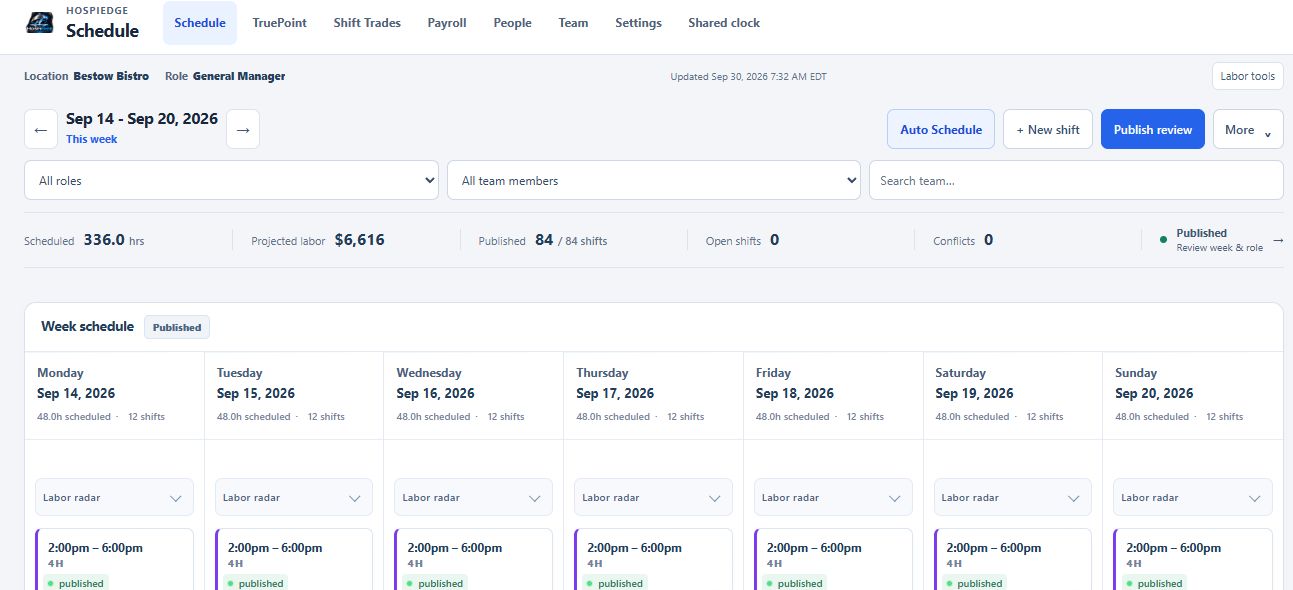
HospiEdge Scheduling gives restaurant teams one workforce command surface for schedule build, labor control, shift coverage, time clocks, timesheet cleanup, payroll-support review, tax packet follow-through, onboarding, and people operations so the week does not break apart after the schedule is published.

Weekly job Keep the labor plan, swaps, attendance, payroll review, and people records moving inside one operating lane instead of rebuilding the story in separate systems.
Best fit Start here when the weekly drag is schedule build time, labor drift, clock cleanup, payroll rework, or disconnected hiring and onboarding.
Commercial path Review workforce proof first, then move to Pricing or Contact once the Scheduling lane already fits the operating job.

Use Scheduling when labor planning, timekeeping, payroll review, and people admin are the first systems to tighten. Move to Contact only when rollout planning or account scope becomes the next question.

Ready now: The HospiEdge site and Scheduling page reflect a strong live build, a real working route, and a product that is ready to use now.

Choose Scheduling when labor planning, timekeeping, and payroll review are the first weekly breakdown

This page should make the starting point obvious: Scheduling leads when the labor plan, shift coverage, clock flow, payroll-support review, and people admin are the part of the week creating the most drag.

Start here when

Building schedules takes too long, approvals and swaps are scattered, timesheet review is messy, payroll-support packets are hard to trust, or hiring and onboarding need to stay tied to the same people record.

Start somewhere else when

Operations should lead when standards, audits, incidents, and leadership follow-through are the urgent issue; POS should lead when service execution, sales, tenders, and checkout truth still need proof; Finance should lead only after the labor and sales packets are already believable.

Next move after fit is clear

Use the rest of this page to verify workforce depth, then move into Pricing, Contact, or the live Scheduling app once the team already agrees Scheduling is the right first workflow.

Scheduling at a glance

See where Scheduling sits, who it serves best, and when standalone Scheduling is enough versus the wider workforce-control path.

What it is

The workforce-operations layer for shift creation, approvals, staffing targets, schedule-linked clock flow, timesheet review, payroll review, tax/liability support, and people admin inside one restaurant system.

Pricing: Scheduling is included with an active platform account. Standalone Scheduling is $199/month.

Who it is for

Operators, GMs, payroll reviewers, HR admins, and multi-unit leaders who need faster schedule creation, cleaner labor controls, and less weekly admin rework.

Why the platform route matters

The active hospiedgetool.org account uses Operations as the anchor plan, keeps Scheduling connected inside that path, and makes more sense once workforce planning needs to stay tied to POS context, HETable, Training & Reader access inside Ops, Hospi Label, and the wider timekeeping/payroll/people-ops implementation path.

Buying clarity

Review workforce proof first, then decide whether standalone Scheduling or the wider platform path is the cleaner launch.

Start with core workflows when weekly labor control is the urgent problem. Move to Pricing when the decision becomes standalone Scheduling versus the active platform account, then open the live app once the route is clear.

Scheduling visuals and real use moments

Scheduling has to work for planners, managers on the floor, and team members checking schedules on the go.

Restaurant auto scheduler on a tablet
Auto-scheduling visuals reinforce the labor-planning story.
Dining room schedule dashboard on a tablet
Managers can review labor in the same environments they lead.
Restaurant schedule dashboard on desktop
Desktop planning remains strong for larger scheduling decisions.
Team planning meeting around a desk
Scheduling supports clearer communication before service begins.
Business handshake across a desk
Approvals, accountability, and manager alignment matter to the labor plan.
Restaurant dining room prepared for service
Labor plans should match the pace and feel of the room they support.

What is restaurant scheduling software?

Modern restaurant scheduling software should do more than publish shifts. It should connect labor planning to timekeeping, timesheets, payroll review, tip context, and people operations so the schedule becomes the start of the weekly workflow.

What is restaurant scheduling software?

It structures shift planning, labor balancing, time capture, and team communication across every week of service.

What should happen after the schedule is published?

Teams should be able to run a personal or shared time clock, review timesheets, pull in payroll-ready labor and tip context, and move directly into payroll and HR follow-through.

Who this restaurant scheduling software is for

Designed for operators who need stronger labor planning and faster weekly schedule workflows.

General managers

Build schedules faster while keeping staffing targets in view.

Multi-unit labor leaders

Standardize schedule quality and approval practices across locations.

Frontline teams

Submit requests, view updates, and manage swaps with less friction using restaurant staff scheduling software tools.

Problems it solves

Workforce and payroll operations issues that slow teams down after the schedule is built.

Slow schedule creation

Use manager build mode, auto scheduling, and staffing targets to reduce weekly planning time.

Approval bottlenecks

Route swaps, pickups, time off, and callouts through one workflow instead of scattered messages.

Labor drift

Track labor forecasts, labor actuals, True Point planning controls, and compliance checks before bad weeks compound.

Clock and timesheet cleanup

Use personal and shared time clock workflows, punch numbers, and timesheet review to reduce missing or messy punches.

Payroll rework

Keep payroll run review, printed checks, worksheet exports, tax tracking, recurring items, off-cycle support, and manual adjustments in the same system as the schedule.

Disconnected people ops

Keep hiring, onboarding, HR profiles, pay rates, invites, and multi-location team controls closer to the labor workflow they affect.

Core restaurant workforce workflows

Built for real restaurant scheduling, timekeeping, payroll, and people-ops workflows instead of a schedule-only tool.

Scheduling and coverage

Use manager build mode, weekly publishing, schedule versions, restore flows, auto scheduling, staffing targets, and role/station assignment to build cleaner weeks faster.

Labor planning and forecast controls

Review labor forecast, labor actuals, compliance checks, True Point settings, presets, and intraday overrides so labor planning stays demand-aware.

Timekeeping and attendance

Capture punches through a personal clock or shared team terminal, manage punch numbers, and review add/edit/delete time entries in timesheets.

Payroll, checks, and tax operations

Run payroll review, approval, finalize, reopen, check printing, statement delivery, journal/export workflows, direct-deposit worksheet exports, liability tracking, reconciliation, and year-end packet preparation from the same workforce system.

Tips and POS-linked payroll context

Pull in POS import, Aloha staging/review, labor punches, sales context, unresolved checkout awareness, and claimed-tip data to support cleaner payroll review.

People ops, locations, and integrations

Manage hiring, onboarding, HR profiles, pay rates, invites, punch numbers, shared staff, transfers, API keys, webhooks, security policies, and location-aware access without leaving the platform.

How HospiEdge Scheduling works after the schedule is published

Scheduling is the front door. The full workflow continues through timekeeping, payroll, POS context, and people operations.

1) Set up locations and team records

Create locations, roles, pay rates, punch numbers, and team records so scheduling, timekeeping, payroll math, and shared-staff controls start clean.

2) Build and publish the week

Use manager build mode, staffing targets, auto scheduling, callout handling, and schedule versions to create and publish coverage.

3) Let the team interact with the schedule

Handle availability, swaps, pickups, time-off approvals, and notification flows without pushing everything into side channels.

4) Run the shift and capture time

Use the personal time clock or shared team clock terminal, then review timesheets, punch exceptions, and labor actuals before payroll closes.

5) Bring in POS, labor, tip, and finance context

Import Aloha/POS data, review labor punches and sales context, carry claimed-tip and unresolved-checkout signals into payroll review, and hand finance-ready payroll packets forward when the stack includes Finance.

6) Run payroll-support workflow and keep people ops connected

Print checks, export direct-deposit worksheets and payroll files, track liabilities, reconciliation, and tax packets, then keep hiring, onboarding, HR profiles, pay rates, recurring payroll items, and finance-ready payroll packets tied to the same platform.

Why restaurants outgrow spreadsheets and generic schedulers

Spreadsheets can publish shifts, but they do not enforce staffing logic, approval consistency, or labor controls at scale. Scheduling software adds structure that helps teams plan faster with fewer hidden errors.

From manual edits to controlled workflows

Standardized request and approval steps reduce avoidable confusion.

From static plans to labor-aware execution

Track labor and compliance signals before they become costly issues.

How HospiEdge Scheduling fits into the full platform

Use the related links below only when operations, floor flow, POS truth, finance handoff, or label workflow become the next question. Keep this page focused on labor planning, timekeeping, payroll-support workflow, and people ops.

Use the same email address across linked HospiEdge accounts when rollout will extend beyond Scheduling. Standalone Scheduling stays valid when workforce control is the only urgent decision.

FAQ

Answers for buyers evaluating restaurant staff scheduling software and restaurant labor control software before deciding whether standalone Scheduling is enough or the wider platform route is cleaner.

What is restaurant scheduling software?

Restaurant scheduling software helps managers build shifts, control labor, manage approvals, capture time, review payroll context, and keep team operations connected after the schedule is published. It replaces spreadsheet-heavy planning with repeatable workflow controls.

How much does HospiEdge Scheduling cost?

Scheduling is included with an active HospiEdge platform account. Standalone Scheduling is $199/month. Launch Partner platform pricing starts at $279/month or $2,899/year for 1 account, with $749/month or $7,799/year for 3 accounts, $2,190/month or $22,999/year for 10 accounts, and AI included in every platform plan.

Does HospiEdge Scheduling include timekeeping, payroll, and HR?

Yes. HospiEdge Schedule includes personal and shared team time clock workflows, punch-number support, timesheet review, payroll run review, printable checks, pay statements, payroll journals and exports, direct-deposit worksheet exports, liability and withholding tracking, tax packet support, hiring workflow, onboarding support, pay-rate controls, and payroll-ready handoff context from final server checkout totals and claimed tips.

Who should start with restaurant scheduling software first?

Start when schedule build time is high, approval requests are scattered, or labor plans drift from real staffing needs. Teams usually adopt faster when manager workflows are clearly structured.

Can scheduling software be used with operations and table workflows?

Yes. Scheduling sits inside the connected HospiEdge platform stack alongside Operations, HETable, POS, Server Checkout as the payroll-ready source of truth, inventory follow-through, staged Menu AI setup, and Hospi Label. Use the same email address across all accounts to keep linked access working.

Can overnight restaurants use HospiEdge without the day changing at midnight?

Yes. Managers can set the operational day rollover time so the business day switches when the operation actually changes over, not just at midnight.

Get access to Scheduling

Scheduling is included with an active platform account. Standalone Scheduling is $199/month. Move into Pricing or Contact when commercial scope or rollout planning is the next question, and open the live Scheduling app when workforce workflow fit is already clear.

Scheduling buyer clarity

Scheduling makes more sense when labor planning, timekeeping, payroll review, and people ops need one weekly operating lane.

Use this page to judge shifts, labor visibility, timekeeping, payroll-support workflow, and people operations first, then move into Pricing, Contact, or the live Scheduling app once that workforce fit is already clear.

Published commercial model

The HospiEdge platform account is the unlock layer, the 1, 3, and 10 account plans are visible publicly, standalone app pricing is published, and Agent stays separate as a premium lane above active bundle apps.

Live routes under one operating model

Ops, Schedule, HETable, POS with Server Checkout, Label, Menu AI, and Training & Reader inside Ops are presented as connected layers of one restaurant operating system, while the HETable buyer page, guest-facing Public Reservations path, Hospi Jobs buyer page, and public jobs network stay clearly split from operator routes.

Visible leadership and direct accountability

HospiEdge keeps the founder-led and family-run company story visible so buyers can connect the software path to named leadership, direct contact, and a clear point of view instead of a faceless shell.

AI and training stay inside the platform story

AI is included in every platform plan, and Training & Reader inside Ops stay tied to execution, standards, and launch support instead of being held back as disconnected extras.

Buyer checklist

  • Start with Pricing when the real decision is platform bundle versus standalone spend, then move into app pages when you need workflow-fit proof.
  • Keep HETable buyer review, Public Reservations, Hospi Jobs, and live operator app routes separate so the next click matches the real job.
  • Use About or Contact when you want to verify who leads the company and how launch and implementation stays direct.
  • Use Resources or Engineering when you want workflow depth, architecture proof, or modernization context.
  • Keep the same email address across HospiEdge accounts when linked access matters.