Buyer Explainer

What Is Restaurant Scheduling Software?

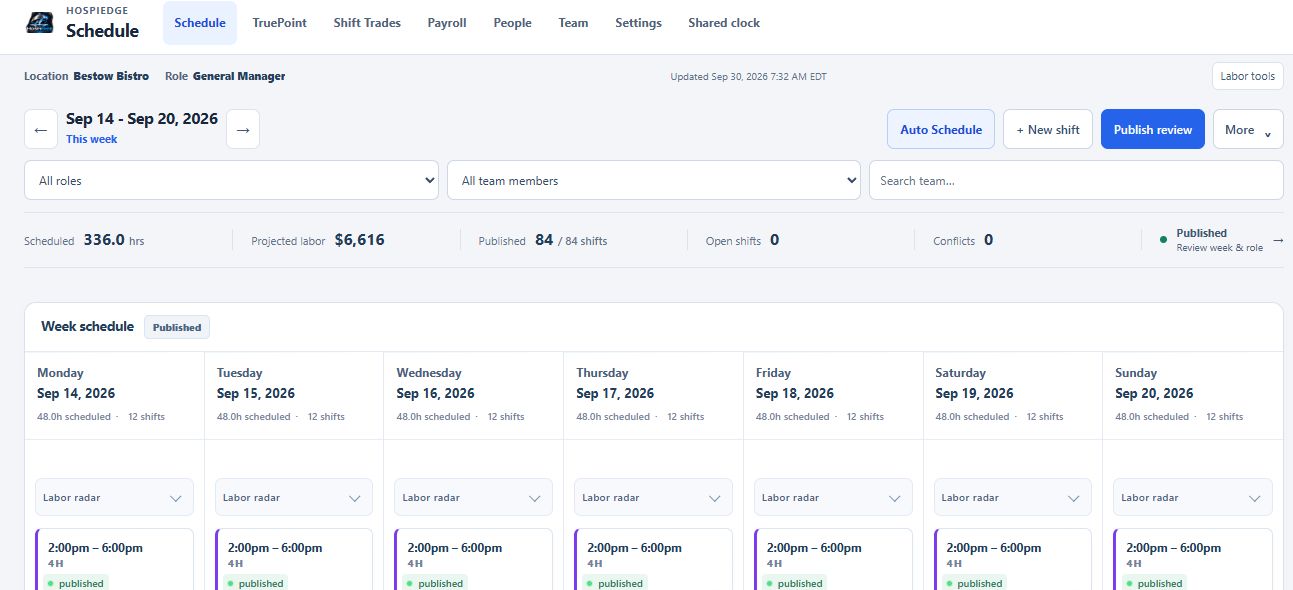
Restaurant scheduling software helps managers build shifts, manage approvals, support schedule-linked clock flow, capture time, review payroll context, track tax/liability work, and keep labor planning structured week to week.

  • Use this guide: compare spreadsheets, scheduling apps, time clocks, payroll review, and the broader labor workflow around them.
  • Next step: move into the Scheduling page for product fit, the Scheduling guide for manager depth, or rollout review when labor planning starts touching the wider stack.

Who this is for

Teams researching restaurant scheduling software and deciding how to tighten labor planning, timekeeping, payroll review, and people-ops follow-through.

General managers

Need faster weekly schedule builds with fewer edits and cleaner timekeeping follow-through.

Labor and payroll leaders

Need better staffing targets, approvals, timekeeping discipline, and payroll review controls.

Multi-unit operators

Need standardized workforce workflows, shared staff controls, payroll-review consistency, and location-aware approvals across locations.

What is restaurant scheduling software in practice?

It gives leaders a repeatable workforce workflow: build shifts, validate staffing levels, approve changes, support clock readiness, review timesheets, pull in payroll context, track payroll admin tasks, and publish updates without scattered side channels.

Manager build mode

Create weekly schedules faster with role, station, and staffing control plus restore-ready versions.

Auto scheduling and targets

Use automation, staffing targets, labor forecasts, and day-level overrides to reduce manual planning time.

Approvals and clock readiness

Handle swaps, pickups, callouts, time-off approvals, and shift-readiness checks in one place before the team hits the clock.

Timekeeping and timesheets

Run personal or shared time clocks, maintain punch numbers, and clean up timesheet exceptions before payroll closes.

Payroll and tax operations

Review payroll, print checks, export direct-deposit worksheets and journals, track liabilities, and prepare year-end packets without forcing the operator into a separate back office system.

People ops and integrations

Keep hiring, onboarding, HR records, pay rates, POS import/Aloha review context, API keys, webhooks, and multi-location controls closer to the schedule they support.

What problems restaurant scheduling software solves

Signals that restaurant labor scheduling software should be prioritized.

Scheduling takes too long

Weekly planning consumes excessive manager time and still needs frequent rework.

Approvals are fragmented

Swap and time-off requests are spread across text threads and side channels.

Labor controls are inconsistent

Staffing plans drift because there is no reliable workflow standard.

Payroll rework keeps piling up

Managers still have to chase punch fixes, manual adjustments, liabilities, or exported payroll details in separate systems.

Beyond scheduling: what operators do after publish

Strong restaurant scheduling software should stay useful after the week is published.

Run the shift and capture time

Clock in and out, review timesheets, correct punch exceptions, and keep labor actuals clean enough for payroll review and check-run prep.

Connect payroll and closeout context

Bring in POS sales, labor punches, tip context, and unresolved checkout awareness so payroll review reflects what actually happened in service.

Handle payroll operations

Review payroll periods, approve/finalize or reopen runs, print checks, export direct-deposit worksheets and journals, and track withholdings, liabilities, reconciliation, and tax packets.

Keep people ops connected

Manage hiring, onboarding, HR records, invites, pay rates, punch numbers, and team access without leaving the same workforce platform.

How to evaluate restaurant scheduling software options

Use this quick filter before committing to a platform.

Labor control depth

Check support for staffing targets, shift swaps, time off approvals, labor forecasts, and labor-control workflows.

Execution readiness

Check whether schedule compliance checks, clock workflows, payroll review, and manager review hold up during peak changes.

How it fits with operations and table workflows

Scheduling sets labor plans and timekeeping discipline. Restaurant operations software handles daily standards, HETable restaurant table management software handles live floor flow, and POS/Server Checkout can add payroll-ready sales and tip context after service. Connect those lanes when the rollout needs it.

How teams usually buy scheduling now

Scheduling often starts as a labor problem, but many teams still review it inside the wider platform because timekeeping, payroll review, floor flow, and closeout context usually need to stay connected.

Core account path

hospiedgetool.org is the active platform account when a team wants connected access across Scheduling and the wider HospiEdge stack.

Main account economics

Launch Partner platform pricing starts at $279/month or $2,899/year for 1 account, with $749/month or $7,799/year for 3 accounts and $2,190/month or $22,999/year for 10 accounts. Scheduling is included with an active platform account, while standalone Scheduling is $199/month. Use pricing when you want bundle economics and rollout scope, not another labor explainer.

Reader access value

The active platform account also keeps Reader access with books by Shalom Bennett, adding training value alongside the labor workflow.

FAQ

Common questions about restaurant shift scheduling software.

What is restaurant scheduling software in plain English?

It is software managers use to build and publish shifts, approve changes, coordinate staffing, capture time through shared and personal clocks, review timesheets, and keep payroll and workforce decisions visible after the schedule is published.

What should restaurant scheduling software include?

Core features should include manager build mode, auto scheduling, staffing targets, swaps, time off approvals, personal and shared time clock workflows, labor forecasting, payroll review tools, people-ops controls, and compliance checks.

When should teams move from spreadsheets to scheduling software?

Teams usually move when schedule creation is too slow, approvals are scattered, and labor plans are difficult to maintain week over week.

How does scheduling software connect with operations and table workflows?

Scheduling sets labor plans, clock flow, and staffing readiness, operations software drives execution standards, table workflows manage live service pace, and POS/Server Checkout can provide payroll-ready sales and claimed-tip context. Together they reduce shift friction and keep payroll follow-through closer to live service reality.