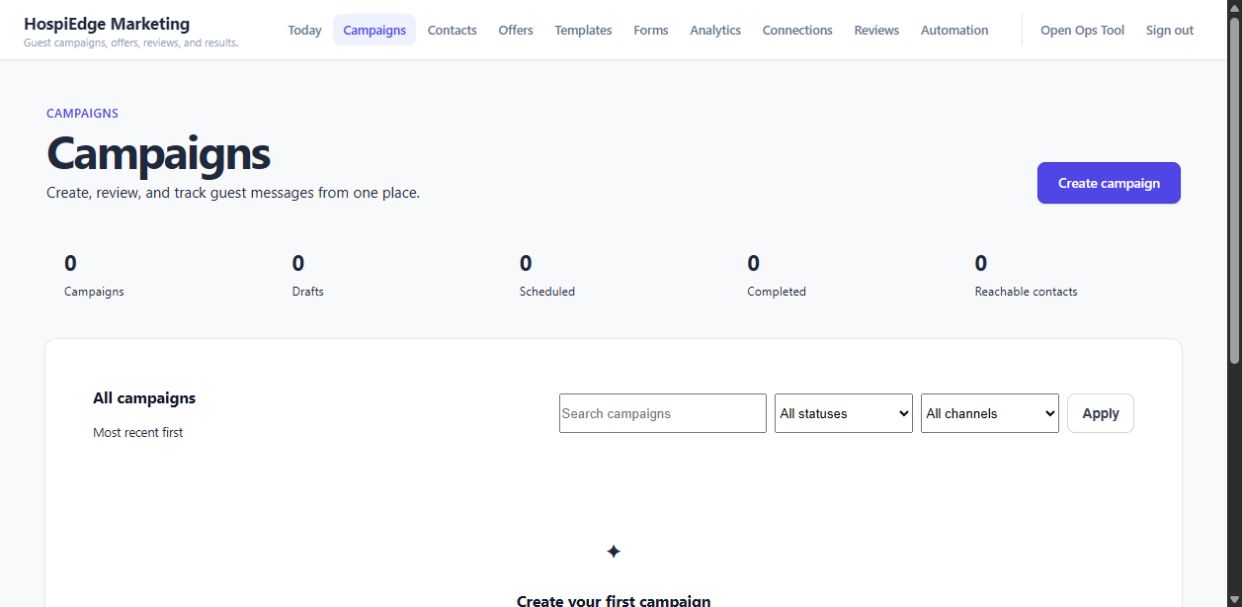
Restaurant marketing included free with every HospiEdge account
HospiEdge Marketing is the restaurant marketing workspace included free with every HospiEdge account. It gives restaurant teams one practical place for campaigns, contacts, offers, reviews, analytics, templates, forms, tracking, approvals, and guest outreach so weekly marketing work can stay organized without needing a separate full marketing department.
Settle the included outreach and campaign workspace first. Use Contact only when rollout planning or packaging becomes the next real job, and treat Master AI as a separate optional add-on when enabled.
Ready now: The HospiEdge site and Marketing page reflect a strong live build, a real working route, and a product that is ready to use now.
Review the included Marketing workspace in this order
Keep the first decision on the included marketing workspace and its public path before sign-in, then move into wider review or launch planning only when the next question genuinely changes.
Step 1
Start here before sign-in when marketing work is scattered
Use this page before sign-in when campaigns, offers, reviews, and guest follow-through are spread across inboxes, disconnected tools, agency notes, and one-off posting routines and the team needs a clearer weekly path.
Step 2
Confirm the included workspace owns the weekly work
Marketing should prove campaigns, contacts, offers, reviews, analytics, templates, forms, and approvals can move as one practical operating workflow before rollout or packaging questions take over.
Step 3
Treat Master AI as a separate optional add-on
Keep the included marketing workspace as the base promise. Move to Master AI only when enabled and the next question becomes cross-app findings or action support. Move to Contact only when rollout planning, packaging, or a direct team conversation becomes next.
What the included marketing workspace should prove first
HospiEdge Marketing should read like one organized guest-growth execution system that is included with the HospiEdge account, not a disconnected stack of one-off campaign tools.
Campaign execution
Plan and launch repeatable email outreach
Campaign drafts, scheduled email sends, offers, and templates stay inside one workspace so restaurant teams can launch real guest outreach without rebuilding the same setup in disconnected tools.
Contacts and audience
Keep the contact list and audience view close to the work
Manual contacts, CSV imports, tags, opt-in flags, and contact notes stay close to campaign and offer context so list health does not drift away from execution.
Reviews and reputation
Handle reviews and reusable responses in the same lane
Review visibility, drafted responses, and reusable response templates sit beside outreach instead of becoming a separate scramble that breaks the guest-growth rhythm.
Analytics and tracking
Track what is landing before the next move
KPI cards, campaign movement, response signals, and list-protection tracking stay visible enough for operators to decide what to repeat, fix, or hand upward into broader analysis.
How restaurant teams should move the weekly work
The marketing workspace works best when teams can use the public path before sign-in, organize the audience and offer, launch email outreach, track response, and escalate only when the next decision becomes wider than marketing itself.
Stage 1
Use the public path before sign-in to settle fit and ownership
Start with the public pre-sign-in path so the restaurant can decide fit, rollout needs, ownership, and the first job that should move before entering the protected workspace.
Stage 2
Organize the audience, offer, and reusable structure
Settle the contact list, guest segment, offer, and reusable templates so recurring restaurant outreach does not require rewriting the operating pattern every time.
Stage 3
Launch email outreach and track response
Launch email campaigns, watch review activity, and track opens, clicks, bounces, unsubscribes, and engagement in the same workspace so the signal stays close to the decision that follows.
Stage 4
Escalate only when the next question is wider than the included base
Bring in Master AI only when it is enabled and leadership wants connected findings or action support above the marketing workspace itself, not before the included marketing fit is already clear.
How included Marketing fits the rest of HospiEdge
Marketing owns guest outreach and campaign execution inside the included base. The rest of the stack keeps workforce, service, operations, finance, labels, and wider AI review in their own bounded workflows.
Included base
Marketing is included free with every HospiEdge account
This route should read as the included guest-growth workspace for campaigns, offers, reviews, analytics, templates, forms, tracking, and approvals without claiming ownership of unrelated service, scheduling, finance, or label workflows.
Linked account access
Marketing launches from a linked HospiEdge account
The workspace supports linked account entry, direct sign-in, readiness checks, and launch-bridge flow from the broader HospiEdge environment instead of acting like a disconnected standalone tool.
Optional add-on
Master AI stays separate from the included base
Master AI belongs on this page only as an optional add-on when enabled. The included base is the restaurant marketing workspace itself.
Choose the next route only after the included fit is clear
Do not spread the close across equal-weight exits. Once the included marketing workspace fits, choose the one next route that matches the next job.
Rollout conversation
Use Contact only when Marketing rollout is the next job
Keep reviewing here until the included marketing workspace itself is settled. Use Contact only when packaging, launch timing, or a direct team conversation becomes next.
Only after fit is clear
Move to Master AI only when the question becomes wider
Open Master AI only when it is enabled and leadership wants connected findings and next-action support above the marketing workspace itself.
Broader route map
Review the full product family if the question changed
Use the broader app map when the buyer is no longer deciding the marketing workspace and needs to compare HospiEdge routes more broadly.
HospiEdge Marketing FAQ
Use these answers when the remaining question is inclusion, ownership, boundary, or the one next route.
What is HospiEdge Marketing?
HospiEdge Marketing is the restaurant marketing workspace included free with every HospiEdge account. It gives restaurant teams campaigns, contacts, offers, reviews, analytics, templates, forms, tracking, approvals, and outreach workflow in one restaurant-focused system.
Who should review the Marketing page first?
Start here before sign-in when guest outreach, offers, review response, or campaign execution are still scattered across generic tools and the team wants one clearer weekly marketing workspace.
How does Marketing connect to the rest of HospiEdge?
Marketing launches from a linked HospiEdge account and connects to the wider platform as the guest-growth and outreach workspace. Master AI can review broader trends and support action across the connected apps only as a separate optional add-on when enabled.
Does Marketing replace every other app in the stack?
No. Marketing owns guest outreach, campaign execution, offers, reviews, contacts, and analytics. It does not replace the workforce, service, operations, finance, or labeling apps that own their own records and workflows.
Is Master AI included in the free Marketing base?
No. The included base is the restaurant marketing workspace itself. Master AI should be presented separately as an optional add-on when enabled.
When should a team move from Marketing to Master AI?
Move to Master AI only after the team already understands the included Marketing workspace and the next question becomes leadership review, cross-app findings, or recommended next actions across the platform.