Buyer Guide

Restaurant Host Stand Software

Use this guide when the buying question is front-door control under pressure: not just reservations and quoting, but how the stand handles arrivals, walk-ins, self-seat traffic, drag moves, pacing decisions, and the handoff into live service without losing a clear next step.

  • Real pressure point: host teams need more than a booking list when arrivals, walk-ins, self-seat traffic, and pacing all collide on the same shift.
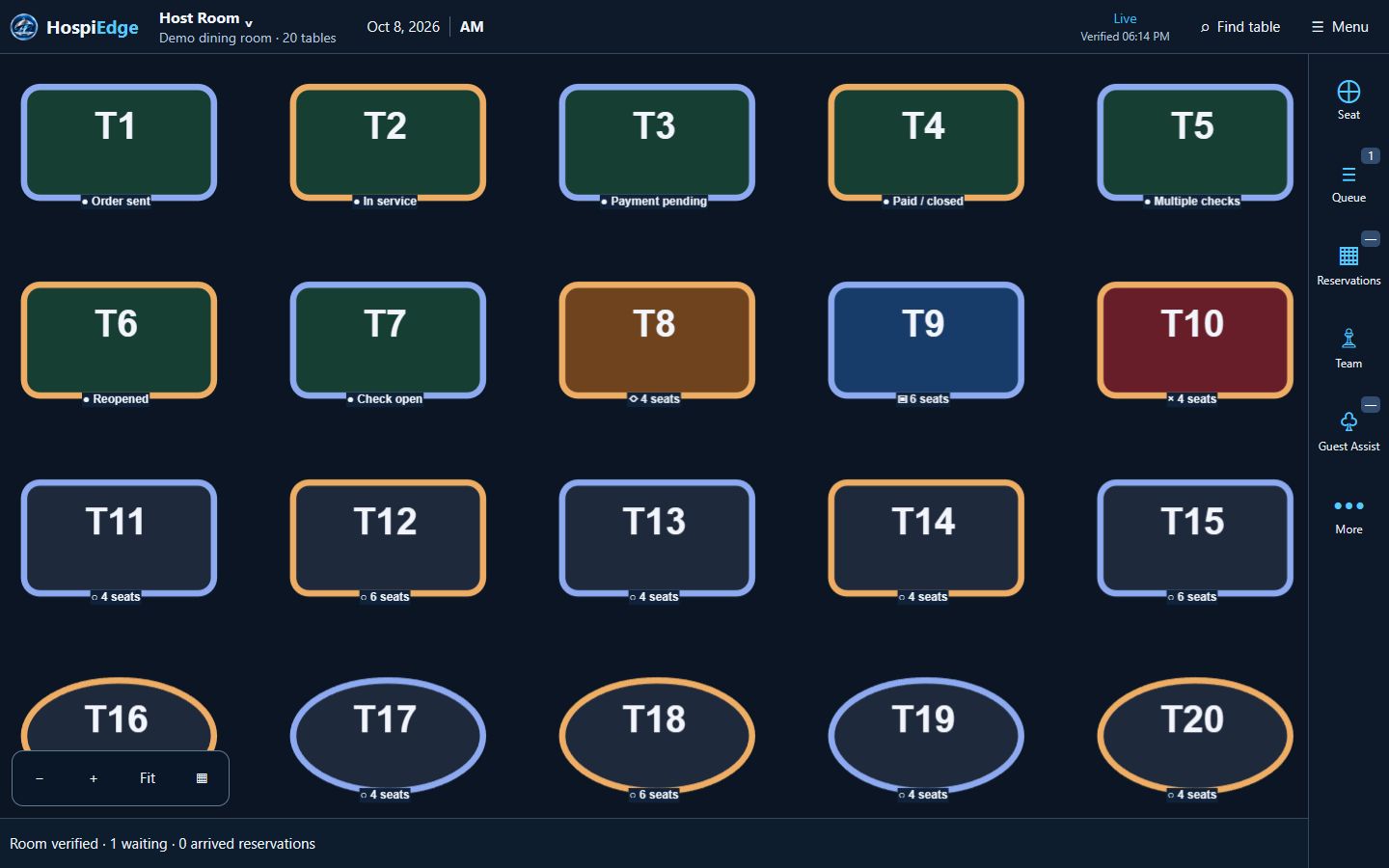
  • HETable angle: in HospiEdge, HETable keeps reservations, the public reservations directory, live waitlist state, suggested seating, guest notifications, drag moves, section balance, and the handoff into service in one front-door workflow.
  • Buyer use: stay here until the team agrees on the host decisions the software must support on a live shift. Move to the HETable buyer page when the workflow needs proof, use Pricing once the category decision is made, and use the live HETable app when operators need to review the stand workflow in motion.
  • Demo checkpoint: verify quote updates, no-show handling, VIP notes, drag moves, manager override moments, and the handoff into service before the team treats pricing or rollout as the next conversation.
Live app routes

Open the live apps directly when you already know the workflow

Already know the workflow you want to review? Open the live app directly, keep the same work email across connected accounts, and add HospiEdge Agent only when leadership wants one cross-app command center above the stack. If the buying decision is still open, price the platform first and use Apps for workflow-fit review.

For guest-facing HETable discovery and booking, use Public Reservations. For public hiring traffic, use Hospi Jobs. Use hetable.com only when you want to review the live host-stand app itself.

Who this is for

This guide is for buyers defining host-stand requirements: guest intake, reservations, queue movement, seat assignments, and real-time floor decisions that affect the rest of service. Stay here while the team is still naming decision rules, move to HETable when live workflow proof is the next question, and use Contact when rollout or implementation questions become specific.

Hosts handling mixed demand

Support teams balancing reservations, walk-ins, self-seat arrivals, special requests, and live wait communication at the same time.

Managers protecting section pacing

Give leaders live context to prevent one section or station from being overloaded while Smart Assign and suggested seating stay grounded in the same floor view.

Multi-unit operators

Standardize host stand management software workflows, booking settings, notification rules, and reporting expectations while keeping local service flexibility.

What problems restaurant host stand software solves

The best tools mirror the decisions hosts make every few minutes during service and keep those decisions connected to the floor and downstream execution.

Arrival and queue intake

Log reservation arrivals and walk-ins quickly with party details, timing context, and notes that survive shift changes instead of living on paper or memory.

Wait communication

Give wait estimates based on live table status, keep guests updated with notifications, and preserve clear next-step visibility for hosts.

Seating execution

Seat parties by section load, Smart Assign logic, and service pacing—not first empty table only.

Floor coordination

Share updates between hosts, managers, servers, Pocket View users, and the live floor board when sections shift during rushes, tables are linked for larger parties, or a seated party needs to be dragged to a new table.

Escalation handling

Surface VIP notes, timing exceptions, and party changes before they become service failures.

Shift handoff clarity

Keep a clean service state so incoming staff can continue without rebuilding context.

Live demo checks for restaurant host stand software

Use these checks to decide whether the next step is a HETable workflow review, a Pricing conversation, or a direct rollout review. They matter most when the stand needs to stay connected to service without making the team guess who acts next.

Before service opens

Confirm floor plan readiness, section assignments, and reservation pace for the opening window. Software should let managers publish changes without confusion at the stand, and hosts should be able to confirm that the right floor and quotes are live before guests stack up.

During peak service

Hosts should see live table state, wait queue movement, section load, suggested seating help, and the downstream service context in one view. This reduces conflicting quote times, over-seating risk, and bad handoff into active checks.

Late service

Teams need quick table status updates for final turns, outstanding waits, and close sequencing. Good software keeps quotes, notes, and seat decisions visible enough for next-day planning and a stronger closeout handoff.

Post-shift proof

Operators should be able to review quote accuracy, wait drop-off, section balance patterns, and override moments to improve tomorrow's decisions.

Implementation considerations

These launch details decide whether host-stand software helps on day one or just adds another screen. Align them before go-live so pricing and rollout conversations stay grounded in the actual front-door workflow.

Training model

Train opening, peak, and close scenarios separately so hosts know exactly how to react under pressure, including no-shows, stale waits, and manager-override moments.

Decision ownership

Define which seating decisions hosts can make and when managers should step in, then test those boundaries in the first-week review instead of leaving them informal.

Success metrics

Track quote consistency, time-to-seat, section pacing, and guest-notification completion to validate impact.

FAQ

Host stand software questions operators ask during evaluation.

What is restaurant host stand software?

Restaurant host stand software is the front-of-house control layer that helps teams manage arrivals, queue movement, table status, and seating decisions in real time.

What should hosts be able to do in one screen?

Hosts should see reservations manager flow, walk-ins, waitlist position, table availability, floor plan context, section load, suggested seating help, and key guest notes in one place to avoid delays and conflicting decisions.

How does host stand software reduce chaos?

It gives everyone the same service state, which lowers miscommunication, duplicate promises, and manual tracking errors during peak periods. The best systems also make it clear when hosts can act alone and when a manager should step in.

Can host stand workflows scale for multi-unit groups?

Yes. Standardized booking settings, published floor views, reports, and locations dashboard oversight make it easier to train teams and maintain consistency across locations.