Restaurant work, in detail

Hiring, employees & labor

Build the team, cover the shift and prepare reviewable labor records.

Prepare roles, locations, employee mappings and the managers who approve hiring, schedules and payroll records.

Find the work you need to do.

Hospi Jobs

Careers & applications

Full Platform; also HE Schedule package

Give an applicant a clear way to apply.

Publish approved job openings and location information, then collect a mobile-friendly application with the required details and attachments.

Before you use it: Prepare the role, location, application requirements and managers responsible for follow-up.

Explore Hospi Jobs in detail →
Hospi Jobs

Candidate portal

Full Platform; also HE Schedule package

Keep the applicant’s next step in one place.

Candidates use protected access to manage their profile, track applications, review messages and handle available interview booking or rescheduling.

Before you use it: Candidate access is separate from employee or restaurant-management access.

Explore Hospi Jobs in detail →

Hospi Jobs

Manager pipeline

Full Platform; also HE Schedule package

Know which candidate needs attention next.

Create, publish, pause or close openings. Review applicants, status, notes, tasks and candidate matches without losing the history.

Before you use it: Assign the hiring managers and location scope; candidate matches support human decisions.

Explore Hospi Jobs in detail →

Hospi Jobs

Interviews & scorecards

Full Platform; also HE Schedule package

Put the conversation beside the application.

Arrange interviews, manage available booking slots and record review information or scorecards with the candidate.

Before you use it: Confirm interviewer availability, review permissions and the criteria your team will use.

Explore Hospi Jobs in detail →

Hospi Jobs

Approvals & messages

Full Platform; also HE Schedule package

Review the decision before the message goes out.

Keep hiring packets, approval tasks and message drafts with the application. Review the intended recipient and outcome before sending.

Before you use it: Configure the delivery path and authorized approvers; a draft is distinct from delivery or a hiring decision.

Explore Hospi Jobs in detail →

Hospi Jobs

Accepted-hire handoff

Full Platform; also HE Schedule package

Carry an approved hire into workforce setup.

Submit the selected hire to the configured Schedule inbox. The receiving team reviews and accepts the person, role and location, with an outcome receipt and retry path.

Before you use it: Confirm the person mapping and receiving location. Acceptance does not grant unrestricted POS sales access.

Explore Hospi Jobs in detail →

Hospi Jobs

Configured providers & exports

Full Platform; also HE Schedule package

Use the hiring channel you have actually configured.

Review available channel mappings, delivery queues and export packs for the enabled recruiting setup.

Before you use it: HospiEdge careers pages are distinct from external job boards. Confirm a specific provider connection before relying on it.

Explore Hospi Jobs in detail →

HE Schedule

Schedules & coverage

Full Platform; also HE Schedule package

Build a week around the work that needs covering.

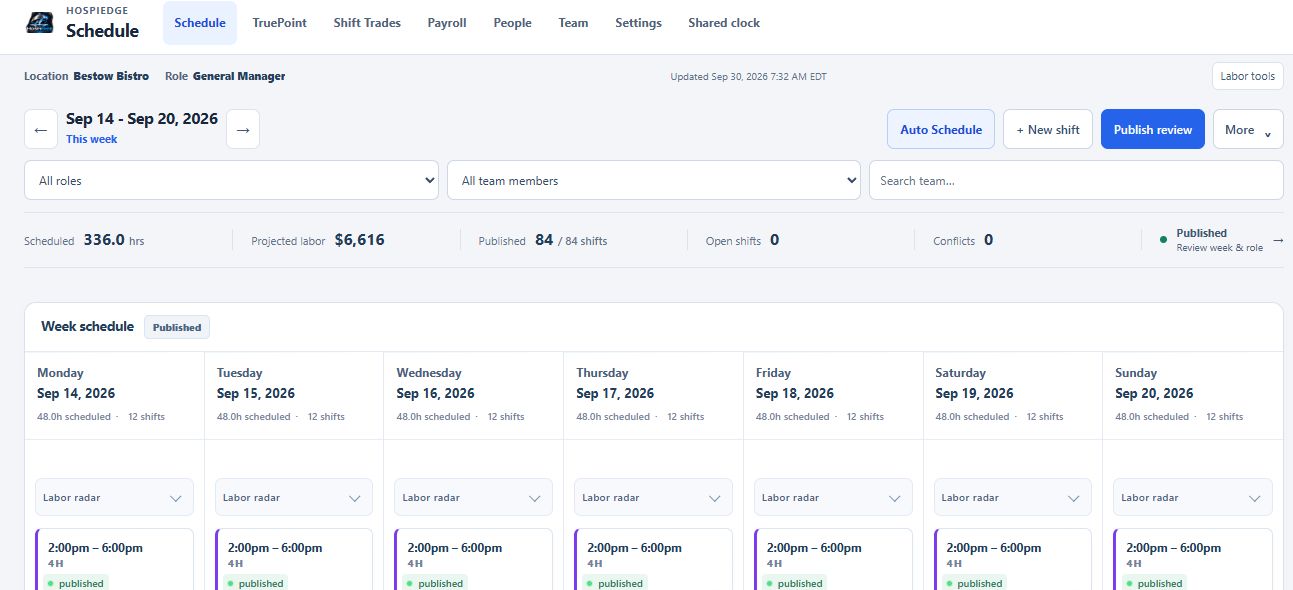
Plan shifts by location, role and station. Compare coverage targets with available people, review a draft and publish the approved week.

Before you use it: Prepare employees, roles, coverage targets and the restaurant’s scheduling rules.

Explore HE Schedule in detail →

HE Schedule

Availability, time off & trades

Full Platform; also HE Schedule package

Keep changes with the schedule they affect.

Collect availability and time-off requests, then review shift trades, callouts and coverage changes through the responsible manager.

Before you use it: Set request rules and approval responsibility; a request does not change an approved shift by itself.

Explore HE Schedule in detail →

HE Schedule

Employee access

Full Platform; also HE Schedule package

Give each employee their own work view.

Invite employees, assign permitted roles and manage authorized location assignments or transfers. Employees review their own schedule and personal work records. Restaurant, location and role permissions govern the available actions.

Before you use it: Confirm the employee’s identity and assignments before granting access.

Explore HE Schedule in detail →

HE Schedule

Clocks & timesheets

Full Platform; also HE Schedule package

Turn attendance into reviewable time records.

Review punches, breaks, missing records and proposed corrections. Preserve the original record and reviewer context as timesheets move toward approval.

Before you use it: Configure the approved clock workflow, pay-period dates and managers who can review corrections.

Explore HE Schedule in detail →

HE Schedule

Labor & TruePoint

Full Platform; also HE Schedule package

Compare the labor plan with the operating picture.

Review staffing demand, coverage and labor actuals together. TruePoint and schedule assistance help managers evaluate a starting point and the exceptions that need attention.

Before you use it: Prepare the available demand sources and targets. Estimates and AI-assisted suggestions still need manager review.

Explore HE Schedule in detail →

HE Schedule

Payroll preparation

Full Platform; also HE Schedule package

Prepare a pay period your reviewer can explain.

Review hours, rates, tips and exceptions for the selected period before preparing payroll-support records and exports.

Before you use it: Confirm mappings and the downstream payroll process. A prepared export is distinct from provider acceptance or paid wages.

Explore HE Schedule in detail →

HE Schedule

Employee onboarding

Full Platform; also HE Schedule package

Prepare the person before the first shift.

Review the accepted hire and onboarding work, establish the employee record, and prepare role, location and availability information for scheduling.

Before you use it: Confirm the accepted person and required records; hiring approval does not by itself publish a shift or create every access grant.

Explore HE Schedule in detail →

HE Schedule

Retention & people follow-through

Full Platform; also HE Schedule package

Keep people issues visible after onboarding.

Review retention records, exit-interview context, director follow-up and the manager’s recorded actions alongside the workforce context.

Before you use it: Choose authorized reviewers and protect employee records. People make employment decisions.

Explore HE Schedule in detail →

HE Schedule

Notifications & administration

Full Platform; also HE Schedule package

Keep team settings and follow-up deliberate.

Manage the available notification preferences, workforce settings and configured integration responsibilities for the selected restaurant.

Before you use it: Confirm delivery services and recipients. A queued notification is distinct from confirmed delivery.

Explore HE Schedule in detail →

Inspect the actual software.

Demo restaurant. Open a capture at full size; its caption identifies the task and any material limitation.

The next handoff

See what carries forward.

Follow the source, the receiving app and the person responsible for the next decision.

Explore the connected journey →

Choose the coverage that fits.

Full Platform; also HE Schedule package · Full Platform; also HE Schedule package.

Compare packages and current availability →
Next step

One restaurant account. The whole operating day.

The Full Platform brings eight base applications and onboarding into one restaurant account. Apply to become a Launch Partner or book a walkthrough of the workflow you want to improve first.

Keep serving through an outage Supported POS and HETable workflows continue on the installed Hybrid Windows computer. Separate tablets and connected services need internet.
Roll out one workflow at a time Start with the clearest operational need, prove it with the team, and expand without creating another account system.
One sign-in for approved apps Each person sees only the restaurants, locations, and HospiEdge apps their account is allowed to open.