Buyer Guide

Restaurant Floor Plan Software

Use this guide when the buying question is floor-control discipline: not just drawing tables, but deciding what your team must publish, who owns section changes, and how the floor stays trustworthy once the room is live.

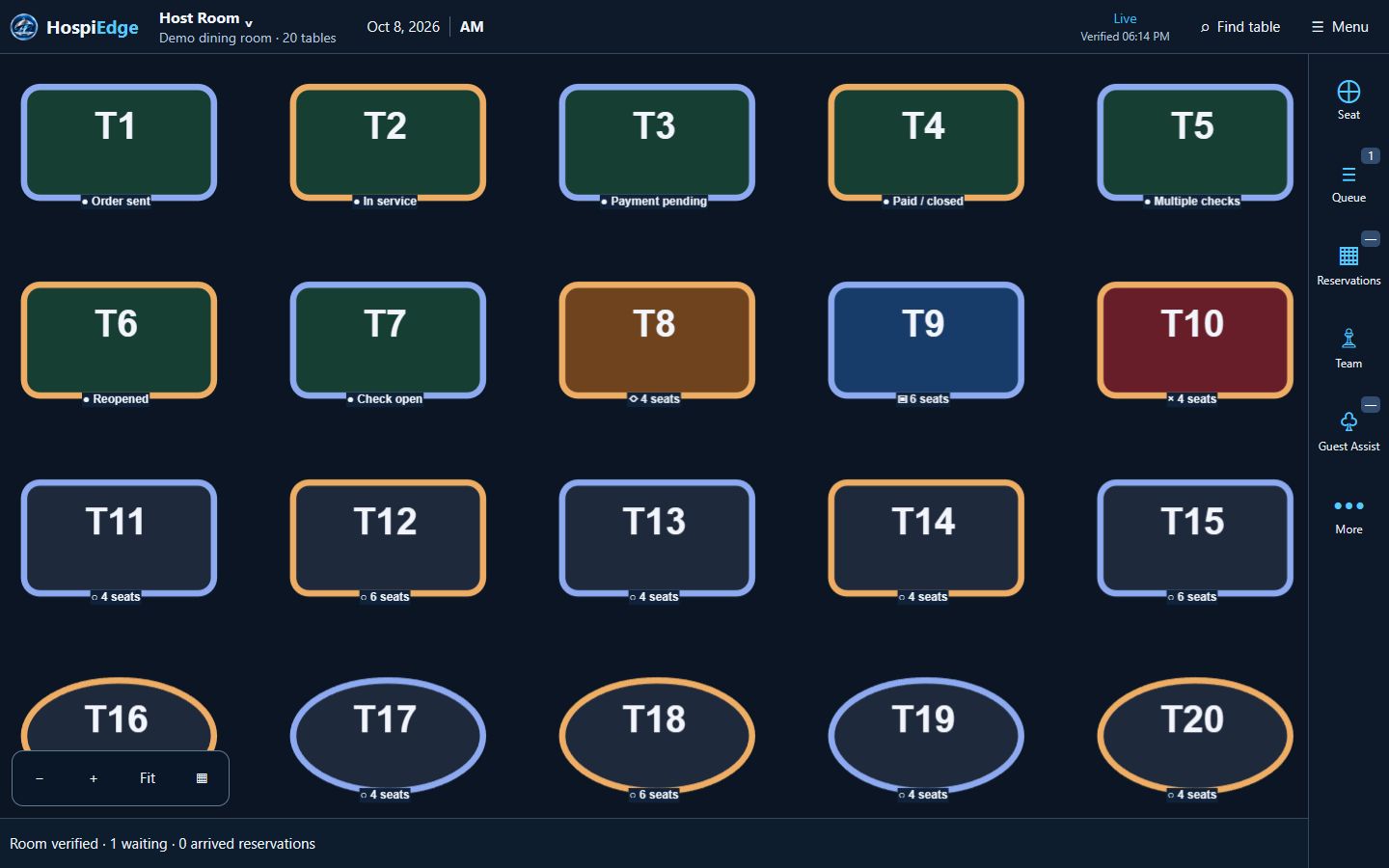
  • Beyond layout: strong floor software gives hosts and managers one active floor source, one published floor view, and live section control instead of a static diagram that breaks down during service.
  • HETable angle: in HospiEdge, this workflow connects to HETable floor control, Smart Assign, Pocket View awareness, drag moves, and the Public Reservations guest path without turning the guide into a full platform tour.
  • Buyer use: stay here while defining category requirements, then move to the HETable buyer page when the team is ready to review operator workflow. Use Pricing or Contact only after the floor-control brief is clear and the next question is rollout or commercial fit.
  • Demo checkpoint: verify publish flow, rollback, section reassignment, active-floor confirmation, and the handoff from active floor state into service. If those checks stay fuzzy in demo, the product is still acting like a floor editor instead of live floor-control software.
Live app routes

Open the live apps directly when you already know the workflow

Already know the workflow you want to review? Open the live app directly, keep the same work email across connected accounts, and add HospiEdge Agent only when leadership wants one cross-app command center above the stack. If the buying decision is still open, price the platform first and use Apps for workflow-fit review.

For guest-facing HETable discovery and booking, use Public Reservations. For public hiring traffic, use Hospi Jobs. Use hetable.com only when you want to review the live host-stand app itself.

Who this is for

Use this guide for requirements definition: published-floor control, section and station handoffs, seating readiness, and whether the floor stays trustworthy once service gets busy. Stay here until the team agrees on who can change the floor, who approves it, and how the live version is confirmed on shift, then move to HETable for workflow proof or into Pricing or Contact once the buying brief is already tight.

Host teams

Need one active layout, one published floor view, and shared table-state rules that hold up during live seating, drag moves, and service handoff.

Service managers

Need section-level visibility, station coverage, and Smart Assign boundaries so pacing and staffing decisions stay aligned.

Multi-unit leaders

Need consistent floor naming, publish discipline, section rules, and launch standards across locations.

What problems restaurant floor plan software solves

The goal is operational clarity: accurate layout state, service-ready section control, and fewer handoff mistakes from the front door to the floor and into POS.

Layout drift

Keep one active floor version so hosts do not run outdated section maps.

Section imbalance

Tie table visibility to section assignments to distribute volume more evenly.

Pacing blind spots

Use live table status and the active published floor view to seat with better timing and reduce service pileups.

Floor plan workflow from setup to service

A simple evaluation sequence: what the software has to support before service, during service, and when the floor changes under pressure. If the product cannot make these steps obvious in demo, keep the guide in category-evaluation mode; if it can, the next move is usually HETable workflow proof or a more direct rollout conversation.

1. Build and label tables

Define table IDs, capacities, linked-table options, and zones so staff can make fast routing decisions without second-guessing the room setup. Buyers should verify whether table naming stays consistent enough for hosts, managers, and servers to speak the same language.

2. Define sections and stations

Assign server sections, station coverage, and Smart Assign boundaries with clear rules for fair pacing and accountability.

3. Publish the active version

Push one service-ready floor map before opening, confirm the active floor source, and communicate any changes. A good launch makes it obvious who publishes and how the team catches a bad publish before guests feel it.

4. Maintain status accuracy

Keep table state current throughout service so host-stand decisions, Pocket View awareness, drag moves, and later service handoff all start from the right floor context.

Live demo checks for restaurant floor plan software

Use this checklist to test whether a tool behaves like live-service software instead of a static floor editor, and whether the opening team can prove that in a few minutes before the conversation moves into HETable workflow review, pricing, or direct rollout questions.

Checks that should pass live

  • Can teams publish floor updates without restarting service flow or losing table-state trust?
  • Are table states visible to hosts and managers in the same view, with the active floor clearly marked?
  • Can sections be adjusted quickly during staffing changes?
  • Is there clear rollback if a layout publish is incorrect?

Launch and review questions

  • How are zone naming standards, published-floor rules, and station conventions enforced across locations?
  • What training is needed for opening verification, mid-shift section changes, and close procedures?
  • How does the system support patio or event-mode changes?
  • What reporting helps diagnose pacing issues by section, floor version, publish history, and handoff quality into live service?

FAQ

Common questions from teams evaluating floor plan tools.

Why does floor plan software matter for front-of-house performance?

A live floor plan gives hosts and managers shared visibility into table status and section load, which improves pacing and seating decisions. In practice it also gives opening managers, hosts, and floor leaders one publish point they can verify before the rush starts.

What floor plan features should buyers prioritize?

Look for version control, easy table edits, drag-and-drop seated-party moves, linked-table support, published floor views, section and station assignment tools, active floor source control, and live status sync so updates stay accurate during service.

How often should teams update digital floor plans?

Most teams review layout changes daily and publish updates whenever sections, patios, or service zones change. The key is not publish frequency alone but whether staff can confirm the active floor quickly on shift.

Can floor plan tools help multi-unit standardization?

Yes. Shared standards for zone naming, section design, and table state rules improve consistency across locations.